What Is the Google Home MCP Server?
Question → Direct Answer:
What is the Google Home MCP server?
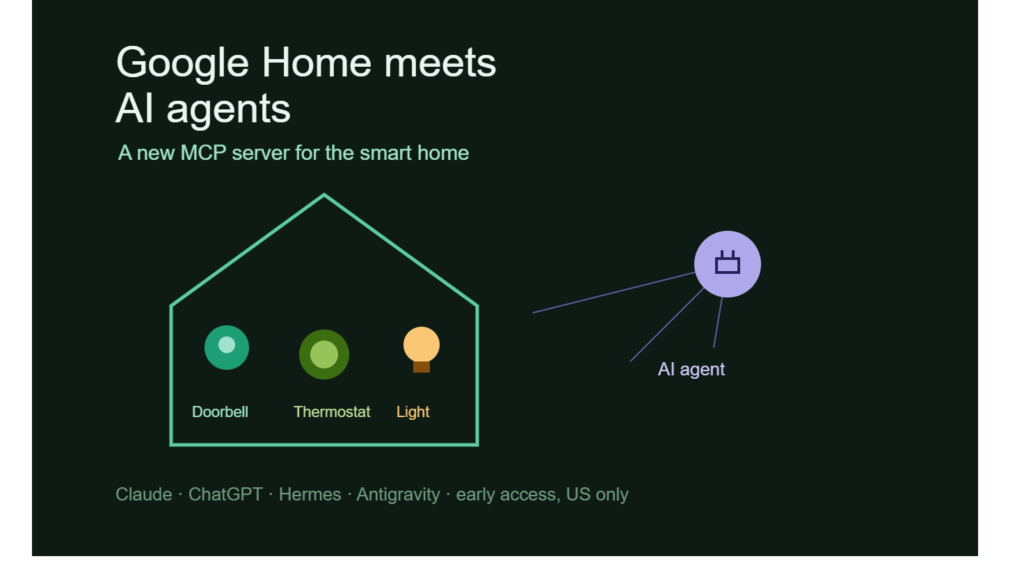
The Google Home MCP server is an early-access connection that allows AI agents supporting Model Context Protocol to interact with devices and information within the Google Home ecosystem.
Instead of requiring an AI assistant to have a completely custom integration for every smart-home device, MCP provides a standardized way for compatible AI applications to discover and use available tools and information.
Google’s implementation is designed to let AI agents work with connected devices, review event history, access camera summaries, and perform certain smart-home actions.
That changes the role of the AI agent. Rather than simply answering a question about your home, the agent can potentially take an action inside the home environment after receiving the necessary permissions.
Definition + Expansion: What Is MCP?
Model Context Protocol (MCP) is an open protocol that provides a standardized way for AI applications to connect with external tools, data sources, and services.
In simple terms, MCP acts as a bridge between an AI agent and an outside system. An AI model can use that connection to retrieve information or perform supported actions instead of operating only on the text available inside the conversation.
For smart homes, that distinction is significant. A traditional chatbot might tell you how to turn off a thermostat; an agent with an appropriate Google Home connection could potentially interact with the thermostat itself.
The Google Home MCP server therefore represents a move from AI that tells you what to do toward AI that can perform authorized tasks for you.
How Does Google Home MCP Work?
The Google Home MCP server is designed around a permission-based connection between a user’s Google Home ecosystem and an AI agent.
The process begins with the user creating a Google Cloud project and configuring it to use Home MCP. The resulting MCP configuration information is then provided to the AI agent the user wants to connect.
The agent subsequently asks the user to sign in and grant the necessary permissions.
This authentication step is important because smart-home devices can have real-world consequences. Controlling a light is relatively low risk, while changing a thermostat, interacting with security-related devices, or accessing camera information can involve considerably more sensitive capabilities.
Question → Direct Answer:
Does an AI agent automatically get access to your Google Home devices?
No. The setup described by Google requires users to configure the connection, sign in, and grant permissions before the agent can interact with the supported Google Home ecosystem.
The Basic Connection Flow
The setup described in Google’s announcement can be understood as a series of steps:
- Create a Google Cloud project.
- Configure the project for Home MCP.
- Provide the MCP configuration to a compatible AI agent.
- Sign in through the authentication flow.
- Grant the requested permissions.
- Use natural-language instructions with the connected agent.
Google said a setup guide would also be available through the Google Home Developer Center.
For beginners, the important concept is that MCP does not mean “give an AI unrestricted control of everything.” The integration still depends on authentication, authorization, and the capabilities exposed by the connected system.
What Can AI Agents Do With Google Home?
The most interesting part of the Google Home MCP server is what happens after the connection is established.
Google says people will be able to use natural-language instructions to interact with their smart-home environment. That includes reviewing camera summaries, monitoring smart-home activity, controlling connected devices, and creating custom smart-home dashboards.
Instead of navigating through menus, users can communicate with an AI agent conversationally.
For example, a user might ask an agent to inspect recent smart-home activity or interact with a connected light. The exact capabilities available will depend on the tools exposed through the integration and the permissions granted by the user.
Natural Language Becomes the Interface
Traditional smart-home control often works through apps, buttons, schedules, automations, or voice commands.
AI agents introduce another layer: intent-based interaction.
Rather than remembering the exact control or navigating a specific screen, users can describe what they want in ordinary language.
That creates an important distinction between conventional automation and agent-based automation.
| Smart-home approach | How users interact | AI involvement | Example |
| Manual app control | Tap buttons and menus | Low | Turn off a light |
| Voice assistant | Spoken command | Moderate | “Turn off the kitchen lights” |
| Automation | Predefined rules | Limited | Turn lights on at 7 PM |
| AI agent + MCP | Natural-language task | Higher | Ask the agent to inspect activity and perform an authorized action |
| Custom AI dashboard | Conversational or visual interface | Higher | Build a personalized view of home activity |
The key difference is flexibility. A predefined automation follows rules created in advance, while an AI agent can interpret a broader natural-language request and decide which available tools to use.
That also introduces new security and reliability questions.
Which Google Home Devices Are Supported?
The Google Home MCP server is intended to work across the Google Home ecosystem.
Google specifically says the system will support devices including Google Nest doorbells and thermostats, along with “Works with Google Home” and Matter-compatible devices such as smart lights.
That means the integration is not limited to a single Google-made device.
Examples of Supported Device Categories
The announcement identifies several categories that can participate in the broader Google Home ecosystem:
- Google Nest doorbells
- Google Nest thermostats
- Works with Google Home devices
- Matter-compatible devices
- Smart lights and other connected-home equipment
Matter is an important part of this story.
Matter is a smart-home interoperability standard designed to help compatible devices work across supported smart-home ecosystems.
For consumers, interoperability can reduce some of the friction involved in mixing devices from different manufacturers. For developers, standards such as Matter can provide a more consistent foundation for building connected-home experiences.
The Google Home MCP server adds an AI-agent layer on top of this ecosystem.
Which AI Agents Can Connect?
Google’s early-access announcement identifies several MCP-compatible AI agents that can work with the integration.
These include:
- Claude
- ChatGPT
- Hermes
- OpenClaw
- Google Antigravity
The broader implication is that Google Home is not limiting the experience to a single AI assistant.
That is significant because MCP is intended to provide a common interface that multiple AI applications can use. A user could potentially choose an agent based on the type of reasoning, interface, workflow, or other capabilities they prefer.
Question → Direct Answer:
Can ChatGPT control Google Home devices through MCP?
Google’s announcement says ChatGPT is among the MCP-compatible AI agents that can connect to the Google Home MCP integration during the early-access rollout, subject to the required setup and permissions.
However, “can connect” should not be interpreted as unrestricted control. The user must complete Google’s configuration and authentication process, and the available actions depend on the permissions and tools exposed through the connection.
What Is Google Home Premium Advanced?
The initial Google Home MCP server rollout is not available to every Google Home user.
Google says early access is rolling out beginning September 16 and continuing over the following weeks to subscribers of Google Home Premium Advanced in the United States.
The subscription costs $20 per month, according to the announcement supplied for this article.
Google Home Premium Advanced includes features such as:
- Longer event-based video history
- Descriptive notifications
- Detailed alerts
- Tools for searching video history
- Daily summaries
- Other advanced Google Home capabilities
This makes the MCP rollout part of a broader premium smart-home offering rather than a universally available Google Home feature.
Will Google Home MCP Be Available in India?
Google has not confirmed a broader rollout to other markets in the announcement.
The company also did not provide a timeline for making the MCP integration available to other subscription tiers.
That means users in India and elsewhere should not assume that the feature is currently available to them simply because they use Google Home or an MCP-compatible AI application.
Question → Direct Answer:
Is Google Home MCP available worldwide?
Not according to the current announcement. Early access is rolling out to Google Home Premium Advanced subscribers in the U.S., while Google has not confirmed when or whether it will expand to other markets or subscription tiers.
For Indian users, the practical takeaway is to watch for an official availability announcement rather than relying on unofficial setup instructions.
Why Is Google Giving AI Agents Access to the Home?
The Google Home MCP server reflects a larger shift in how AI companies think about assistants.
A chatbot traditionally responds to information provided within a conversation. An AI agent can go further by connecting to external systems and using tools to complete tasks.
That makes the home another environment where agents can operate.
Imagine the difference:
Chatbot: “Your living-room thermostat is set to 24°C.”
Agent: “I checked the thermostat and changed it to the setting you requested.”
The second experience requires more than language generation. It requires authentication, permissions, tool access, system integration, and reliable execution.
This is why MCP is becoming relevant to AI developers.
From Chatbots to Agents
AI agents are designed to combine reasoning with tool use.
A typical agent workflow might look like:
User request → AI interprets intent → Agent identifies available tool → Permission check → Tool executes action → Agent reports result
Each stage matters.
If the agent misunderstands the request, it could select the wrong action. If permissions are too broad, the agent may have more access than necessary. If the external service behaves unexpectedly, the agent needs to handle the failure safely.
As AI moves into physical environments, these concerns become more important.
What Are the Security and Privacy Questions?
The Google Home MCP server also raises questions that do not exist in the same way when an AI agent is only answering text questions.
A smart home contains information about people’s routines, locations, activities, and habits.
Camera summaries and event history can reveal when someone enters or leaves a property. Thermostat activity can reveal occupancy patterns. Connected-device activity can provide clues about daily routines.
Giving an AI agent access to that information therefore requires careful consideration.
Question → Direct Answer:
Why does AI access to smart-home data create privacy concerns?
Because smart-home data can reveal highly personal information about household activity, while device-control capabilities allow software to affect the physical environment.
Permissions Matter
Users should understand what permissions an AI agent is requesting before approving a connection.
The principle of least privilege is particularly relevant here.
Least privilege means giving an account, application, or agent only the access it needs to perform a specific task.
For example, an agent that only needs to control lights may not need access to historical camera events.
A more granular permission model can reduce the potential consequences of an accidental or malicious action.
AI Agents Need Guardrails
As agents gain the ability to take real-world actions, developers also need safeguards around what an agent can do.
Useful safeguards can include:
- Clear permission boundaries
- Confirmation for sensitive actions
- Activity logs
- Easy permission revocation
- Limited access to private information
- Strong authentication
- Monitoring for unusual behavior
- Clear explanations of actions taken
The goal is not necessarily to prevent agents from doing useful work. It is to make sure that useful automation does not turn into uncontrolled automation.
How Is This Different From Google Assistant?
It is easy to look at this announcement and think: “Didn’t Google already let people control smart-home devices with voice commands?”
Yes, Google Home has long supported conventional smart-home control.
The difference is the agent architecture.
A traditional assistant generally responds to a predefined set of commands and capabilities. An AI agent can interpret more flexible instructions and potentially combine multiple tools to accomplish a broader task.
Consider a simple request such as:
“What happened around my front door while I was away, and make sure the porch light is on tonight.”
An agent could potentially need to retrieve relevant home activity, interpret that information, and then perform a device-control action.
That is more complex than responding to a single command such as “Turn on the porch light.”
The Google Home MCP server is therefore part of a transition toward more flexible AI-driven interaction with connected environments.
Why MCP Matters Beyond Google Home
Google already supports MCP in several other parts of its technology ecosystem, including Google Cloud, data platforms, developer tools, and Google Workspace.
The Google Home integration brings that concept closer to consumers.
This matters because MCP can become a common layer between AI applications and external services.
For developers, that can mean fewer bespoke integrations.
Instead of building an entirely different connector for every AI application, a service can expose capabilities through an MCP-compatible interface, while different AI agents can potentially connect to those capabilities.
The Emerging Agent Economy
Think of MCP as a common language for connecting AI agents to tools.
The AI model provides reasoning and natural-language interaction. The external service provides data or actions. MCP helps establish the interface between them.
That model could eventually extend far beyond smart homes.
Potential categories include:
- Productivity applications
- Customer-service systems
- Developer tools
- Enterprise databases
- Financial workflows
- Travel services
- Smart appliances
- Industrial systems
The Google Home announcement is notable because it brings this agent-tool model into an environment where software can affect physical devices.
What Does Google Home MCP Mean for AI Careers?
For students and freshers, the Google Home MCP server offers a useful example of where AI development is heading.
Learning how to build a chatbot is increasingly only one part of the AI-development landscape. Developers also need to understand how AI systems interact with APIs, tools, authentication systems, databases, and real-world devices.
Skills worth exploring include:
- API integration
- MCP development
- Authentication and authorization
- Tool calling
- Agent orchestration
- Cloud development
- IoT fundamentals
- Smart-home protocols such as Matter
- AI security
- Privacy engineering
- Monitoring and observability
A developer who understands both AI and system integration can work on applications that do more than generate text.
They can build agents that retrieve information, coordinate workflows, interact with software, and,where properly authorized,control connected devices.
That is a major shift in the nature of AI applications.
The Bigger Picture: AI Is Moving Into the Physical World
The Google Home MCP server is more than a smart-home feature.
It represents a broader trend in which AI agents are being connected to systems that can observe and change the world around us.
For years, AI assistants mainly lived inside screens. Now they are increasingly being connected to calendars, software tools, databases, vehicles, smart appliances, and other environments.
The convenience can be substantial.
Instead of learning dozens of interfaces, a person can describe an outcome and allow an agent to coordinate the required tools.
But greater capability also means greater responsibility.
An AI agent that can send an email is one thing. An agent that can access a camera history or control a physical device introduces another category of risk.
Question → Direct Answer:
What is the biggest takeaway from Google’s Google Home MCP announcement?
Google is making it possible for compatible AI agents to interact with Google Home devices and activity through MCP, moving smart-home control from isolated commands toward more flexible, permission-based agent workflows.
The technology is still in early access, and Google has not announced broader availability. But the direction is clear: AI agents are increasingly being designed not just to answer questions, but to interact with the systems around us.
FAQ: Google Home MCP Server
What is the Google Home MCP server?
The Google Home MCP server is an early-access integration that allows MCP-compatible AI agents to interact with supported Google Home devices and access smart-home activity after users complete the required setup and grant permissions.
Can ChatGPT control Google Home devices?
Google says ChatGPT is among the AI agents that can connect to its Google Home MCP integration during the early-access rollout. Users must configure Home MCP, authenticate, and grant the required permissions.
Which devices work with Google Home MCP?
Google says the integration supports devices in the Google Home ecosystem, including Google Nest doorbells and thermostats and compatible “Works with Google Home” and Matter devices such as smart lights.
Do I need Google Home Premium Advanced?
For the initial rollout, yes. Google says early access is being made available to Google Home Premium Advanced subscribers in the U.S., with access rolling out over the coming weeks.
Is Google Home MCP available in India?
Google has not announced broader availability for India in the supplied announcement. The initial rollout is for eligible subscribers in the U.S., and Google has not confirmed when the feature will expand to other markets or subscription tiers.
Is MCP the same as an AI assistant?
No. MCP is a protocol that helps AI applications connect with external tools and services. An AI agent can use MCP to interact with those tools, while the agent itself provides the reasoning and task-oriented interaction.
What Should Users Watch Next?
The Google Home MCP server is still an early-access feature, so its broader impact will depend on how Google expands availability, what capabilities it exposes, and how developers build around the connection.
For anyone learning AI, the important lesson is already visible: the next generation of AI applications will increasingly combine language models with tools, permissions, APIs, and physical devices.
Keep exploring Kalinga.ai for practical explainers on AI agents, emerging protocols, smart technology, and the skills shaping tomorrow’s tech careers.