Why Is Anthropic Merging Claude Chat and Cowork?
If you’ve ever opened an AI application and wondered whether you should use chat, an agent mode, a workspace, or another specialized tool, Anthropic is trying to remove that decision.
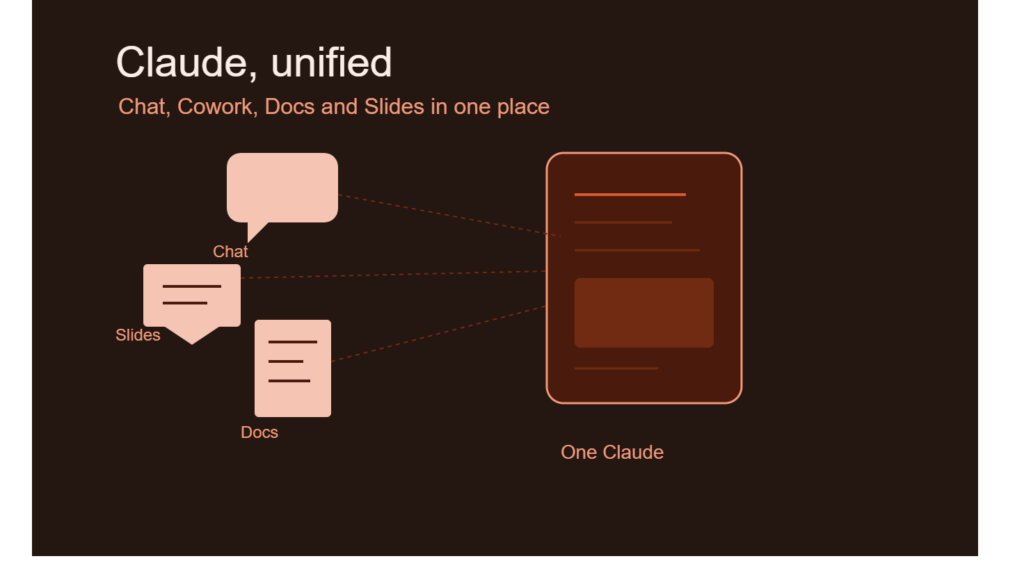
The company is merging Claude chat and Cowork into a unified Claude interface, allowing users to access multiple Claude capabilities from one window. According to TechCrunch’s September 16 report, Anthropic said customers had been struggling to determine which tab was appropriate for different tasks.
Question → Direct Answer:
Why is Anthropic combining Claude chat and Cowork?
Anthropic is combining the experiences so users do not have to decide which Claude feature to use before starting a task. Instead, Claude can route a request to the appropriate capability within the same interface.
The change reflects a broader shift in AI products.
Early AI assistants were primarily designed around a conversation box: type a question, receive an answer, and continue chatting. Newer AI systems increasingly perform tasks involving files, documents, presentations, interactive workspaces, research, and other tools.
The interface therefore becomes more than a place to exchange messages.
It becomes a workspace where different AI capabilities can operate behind a single conversational entry point.
What Is Claude Cowork?
Definition + Expansion: Claude Cowork
Claude Cowork is Anthropic’s task-oriented workspace for getting Claude to work on more complex jobs rather than simply responding to individual questions.
The important distinction is between asking Claude something and asking Claude to work through something.
A traditional chat interaction might involve asking Claude to explain a topic or rewrite a paragraph. A task-oriented workflow can involve creating material, working with files, developing a document, or completing multiple stages of a project.
Anthropic has been expanding Cowork’s capabilities, including its memory layer. TechCrunch previously reported in August that Cowork was being upgraded to remember user context across chats.
That development becomes more relevant when Cowork is integrated directly into the main Claude experience.
Instead of thinking about Cowork as a separate destination, users can increasingly treat it as one capability available inside Claude.
Question → Direct Answer:
Is Claude Cowork replacing Claude chat?
No. The September 2026 update combines access to Claude chat and Cowork within one interface rather than eliminating chat. Users can interact with Claude conversationally while the system routes appropriate requests toward Cowork and other capabilities.
What Does the New Claude Interface Include?
The unified experience brings several Claude capabilities together.
Anthropic says users can access chat, Cowork, and Artifacts from the same window. Claude Design, the company’s feature for creating websites and prototypes, can also be used throughout Claude rather than being confined to a separate interface.
That creates a much more integrated workflow.
A user might begin with a simple conversation, move into creating an interactive Artifact, ask Claude to develop a design, and then continue working on a larger project without manually switching between different product areas.
The Main Components
The unified Claude experience brings together several distinct capabilities:
- Claude Chat: Conversational interaction with Claude.
- Cowork: More task-oriented AI work.
- Artifacts: Interactive workspaces for Claude-generated content and applications.
- Claude Design: Tools for creating websites and prototypes.
- Documents: Collaborative document creation and editing.
- Presentations: AI-assisted slide creation, editing, and presentation.
The significance isn’t simply that more features exist.
It’s that Anthropic is attempting to make those features feel like different capabilities of one AI workspace.
How Does Claude Automatically Route Tasks?
One of the biggest changes is that users no longer need to understand the product architecture before starting work.
Previously, a person might have needed to ask:
Should I use Claude chat or Cowork for this?
With the new design, Anthropic says Claude can automatically route requests to the relevant part of the product.
Question → Direct Answer:
How does automatic routing work in Claude?
The user describes what they want in the unified interface, and Claude determines which available capability should handle the task instead of requiring the user to manually select a separate tab first.
This is an important usability change.
The complexity doesn’t disappear. Instead, some of that complexity moves from the user interface into the AI system.
From Feature Selection to Intent
Consider two approaches.
| Workflow | User responsibility | AI responsibility |
| Separate tools | Choose the correct feature first | Complete the task inside that feature |
| Unified Claude | Describe the desired outcome | Determine the appropriate capability and perform the task |
The second approach is closer to how people naturally think.
Most users don’t necessarily care whether a task is technically handled by chat, Cowork, Artifacts, or another internal capability.
They care about the outcome.
If someone wants a presentation explaining a business idea, their actual request is likely to be:
“Create a presentation explaining this idea.”
They may not know,or want to know,which underlying Claude feature should handle it.
That’s the problem Anthropic’s unified interface is designed to address.
What Can Claude Do With Presentations?
Anthropic is also adding dedicated presentation capabilities to the experience.
Users can ask Claude to create, edit, and present slides, according to the TechCrunch report. Generated presentations can also be downloaded as PDF or PowerPoint files.
That changes Claude’s role from a writing assistant into something closer to a productivity application.
For example, a student could potentially start with a research topic and ask Claude to turn the material into a structured presentation. A professional could work on a business presentation and then make changes through conversation.
The important point is that the AI isn’t limited to generating text inside the chat window.
It can help produce a tangible work product.
Question → Direct Answer:
Can Claude create PowerPoint presentations?
Yes. Anthropic’s September 2026 update says users can ask Claude to create and edit presentations and download the resulting presentation as a PowerPoint or PDF file.
How Do Claude Documents Work?
Anthropic is also introducing a Docs feature for working on documents alongside Claude.
The workflow is designed to be collaborative rather than simply generating a finished document in one response.
Users can work with Claude to:
- Create document sections
- Ask questions about the document
- Comment on completed portions
- Continue editing the content
- Share generated documents through a link
This makes the AI assistant resemble a collaborative workspace.
Instead of:
Prompt → Generate → Copy → Paste → Edit
the workflow can become:
Prompt → Create → Review → Comment → Revise → Share
That difference matters for productivity because most real-world documents require several rounds of editing.
Why Collaborative Editing Matters
AI-generated text is rarely the complete workflow.
A report may need changes to tone. A presentation may need a different structure. A proposal may require new information. A student’s assignment may need clarification or additional examples.
An integrated document environment lets users work through those changes without constantly moving content between applications.
That is particularly useful when the AI system can retain context throughout the task.
Can You Continue Claude Work on Mobile?
Anthropic is also extending the workflow across devices.
The company says users can start creating a document on desktop and then check the progress of the task using the mobile app. Users can also edit shared documents or slides from their phones.
This is another sign that Claude is being positioned as a persistent productivity environment rather than a standalone chatbot.
Desktop-to-Mobile Workflow
Imagine starting a project before leaving work:
- Start a document on desktop.
- Ask Claude to develop additional sections.
- Leave the computer.
- Open Claude on your phone.
- Check the task’s progress.
- Review or edit the output.
- Continue the work later.
The value here isn’t simply mobile access.
It’s continuity.
Users increasingly expect AI tools to remember where work stopped and allow them to continue from another device.
How Does Claude’s Memory Fit Into Cowork?
The unified interface arrives shortly after Anthropic upgraded Cowork’s memory capabilities.
According to TechCrunch’s August 25 report, Anthropic introduced improvements intended to help Cowork remember user context across chats.
That matters because task-oriented AI becomes significantly more useful when it doesn’t have to start from zero every time.
Imagine working on a long-term project involving:
- A research document
- Several presentations
- Design prototypes
- Supporting files
- Multiple rounds of feedback
If the system can retain relevant context, users don’t necessarily need to repeat every instruction each time they return.
Question → Direct Answer:
Why is memory important for Claude Cowork?
Memory can help Claude maintain relevant context across conversations, making longer-running workflows easier to continue without repeatedly explaining the same project background.
However, memory also makes privacy and control more important.
Users need to understand what information an AI system retains, how that information is used, and what controls are available.
Which Claude Plans Get the New Features?
The rollout is initially focused on Claude Pro and Max subscribers.
Anthropic says the new capabilities are rolling out across web, desktop, and mobile over the coming weeks. The company plans to extend them to free and team tiers later.
That means availability depends on both the user’s subscription and the stage of the rollout.
| Claude access | New unified experience |
| Pro | Initial rollout |
| Max | Initial rollout |
| Free | Planned for later |
| Team | Planned for later |
| Web | Rolling out |
| Desktop | Rolling out |
| Mobile | Rolling out |
The timing matters because product announcements do not always mean every account receives a feature simultaneously.
Users may therefore see differences in availability while Anthropic completes the rollout.
Question → Direct Answer:
Is the unified Claude interface available to free users?
Not initially. Anthropic says the features are rolling out first to Pro and Max subscribers, with plans to extend them to free and team tiers later.
Claude Chat vs. Cowork: What’s Changing?
The easiest way to understand the update is to compare the old mental model with the new one.
Previously, users could think of Claude as a collection of distinct capabilities.
Now Anthropic is trying to make the experience feel more like one environment with multiple capabilities operating behind it.
| Aspect | Separate-feature approach | Unified Claude approach |
| Starting a task | Choose a feature | Describe the task |
| Chat | Separate interaction | Integrated |
| Cowork | Dedicated workflow | Integrated |
| Artifacts | Separate capability | Accessible in the same interface |
| Design | Specialized experience | Available throughout Claude |
| Documents | Separate productivity workflow | Integrated |
| Presentations | Dedicated task | Integrated |
| Device continuity | More fragmented | Desktop and mobile workflow |
This doesn’t mean the underlying technologies have become identical.
Instead, Anthropic is reducing the amount of product knowledge users need before they can begin.
What Does This Mean for AI Productivity?
The broader trend is clear: AI products are moving from chatbot interfaces toward task-oriented workspaces.
The first generation of generative AI interfaces trained people to think in prompts.
The next generation increasingly asks users to describe goals.
That distinction sounds small, but it can change how people interact with software.
Prompt-Based AI
A conventional workflow looks like:
User → Prompt → AI response → User performs the next step
For example:
“Write an introduction for my report.”
The AI generates the text, but the user still has to place it into the report and continue the workflow.
Agentic Productivity
A more integrated workflow could look like:
User → Goal → AI selects tools → AI creates artifact → User reviews → AI revises
For example:
“Turn my research notes into a presentation and prepare a document version.”
The AI system has more responsibility for coordinating the work.
Claude’s unified interface is therefore part of a broader movement toward AI-assisted task execution rather than AI-generated responses alone.
What Are the Benefits of a Unified Claude Interface?
A single interface can reduce several types of friction.
1. Less Feature Confusion
Users don’t have to learn exactly where each Claude capability lives before beginning.
2. More Continuous Workflows
Chat, documents, presentations, Artifacts, and design tools can operate within a connected experience.
3. Better Cross-Device Continuity
Users can begin work on a desktop and continue monitoring or editing it through mobile.
4. More Natural Interaction
Users can describe what they want instead of translating their goal into the application’s feature structure.
5. Broader AI Productivity
Claude becomes useful for more stages of a project rather than primarily answering questions.
These benefits depend on how well the underlying routing and task execution work in practice.
A simpler interface does not automatically guarantee better results. Users still need to review AI-generated work, especially when accuracy, formatting, or business decisions matter.
What Should Users Watch Out For?
A unified AI workspace also creates new considerations.
When more capabilities are available through one interface, the AI may have access to more tools and potentially more user information.
That makes permission management and data handling important.
Users should pay attention to:
- What files they provide to Claude
- What information is retained as memory
- Which tasks the system can perform
- What external tools or capabilities are connected
- Whether generated documents contain errors
- Whether presentations accurately represent source material
- What sharing permissions are applied to generated links
The convenience of an integrated workspace should not replace human review.
For important academic, professional, financial, or business documents, users should still verify facts and inspect the final output before sharing it.
What Does This Mean for Students and Freshers?
For students and young professionals, the Claude update offers a useful lesson about where AI skills are heading.
Learning how to write prompts remains useful, but it is becoming only one component of AI literacy.
Modern AI workflows increasingly involve understanding how models connect to tools and produce usable outputs.
Important skills include:
- Prompt and instruction design
- AI-assisted research
- Document automation
- Presentation generation
- Workflow design
- File and data handling
- AI tool evaluation
- Fact-checking AI outputs
- Understanding AI memory and privacy
- Human-in-the-loop review
The last skill is particularly important.
As AI systems take on more responsibility for completing tasks, people need to become better at reviewing, directing, and validating AI work, rather than simply generating prompts.
AI Productivity Is Becoming a Workflow Skill
A student who knows how to ask Claude for a paragraph has one useful skill.
A student who can define a project, provide relevant source material, structure the work, use AI to produce drafts, verify the output, revise it, and turn it into a polished presentation has a much broader workflow capability.
That distinction will matter as AI applications increasingly combine chat, agents, documents, design, and other tools.
What Is the Bigger Picture for Anthropic?
The Claude interface update comes at an important point in the development of AI assistants.
AI companies are increasingly trying to make their products behave less like isolated chatbots and more like general-purpose work environments.
Anthropic’s approach combines several elements:
Claude conversation + Cowork + Artifacts + Design + Documents + Presentations + Memory
The goal is to make these capabilities feel like parts of one product rather than unrelated tools.
The strategy also reflects a larger product-design question:
Should users learn how an AI product is organized, or should the AI understand what users want and decide which capability to use?
Anthropic is moving toward the second model.
That could make AI applications easier for newcomers to use, while simultaneously making the underlying technology more complex.
What Comes Next for Claude?
The September 2026 rollout is only the beginning of this interface strategy.
Anthropic says the features will initially reach Pro and Max users, with free and team tiers planned for later. The company will also need to continue refining how Claude routes tasks, maintains context, handles files, and transitions between different capabilities.
For users, the most important change is straightforward:
You increasingly don’t have to know which Claude feature you need before asking Claude to do something.
You can describe the outcome.
Claude’s interface is then designed to determine which capabilities can help accomplish it.
That is a meaningful shift from feature-driven software toward intent-driven AI.
FAQ: Claude Cowork and the Unified Claude Interface
What is Claude Cowork?
Claude Cowork is Anthropic’s task-oriented Claude experience designed to support more complex work beyond ordinary conversational interactions. Anthropic has been expanding Cowork with features including improved memory and broader productivity capabilities.
What changed between Claude chat and Cowork?
Anthropic is bringing Claude chat and Cowork together in one interface so users do not have to manually decide which tab to use. Claude can route requests to the appropriate capability based on the task.
Can Claude create presentations?
Yes. Anthropic says users can ask Claude to create, edit, and present slides, with generated presentations available for download as PDF or PowerPoint files.
Can Claude create documents?
Yes. The new Docs feature allows users to work with Claude on documents, including creating sections, asking questions, commenting on completed sections, and sharing generated documents through links.
Is Claude’s unified interface available to everyone?
Not initially. Anthropic says the rollout begins with Pro and Max subscribers across web, desktop, and mobile, while free and team access is planned for later.
Why does Claude memory matter for Cowork?
Memory can allow Claude to retain relevant context across chats, which can make longer-running projects easier to continue. Anthropic previously announced a Cowork memory upgrade designed to help Claude remember user context across conversations.
What Should Users Take Away From the Claude Update?
Anthropic’s latest Claude update is less about adding another AI feature and more about changing how users interact with AI features.
Instead of forcing people to understand the difference between chat, Cowork, Artifacts, Design, documents, and presentations, Anthropic is putting those capabilities behind a more unified interface.
For students, professionals, and AI users, the bigger lesson is that productivity AI is increasingly moving from “ask a chatbot” to “give an AI a task.”
As these systems become more capable, understanding how to direct, verify, and collaborate with AI will become just as important as knowing how to prompt it.
Keep exploring Kalinga.ai for practical explainers on AI agents, productivity tools, emerging technologies, and the skills shaping the future of work.