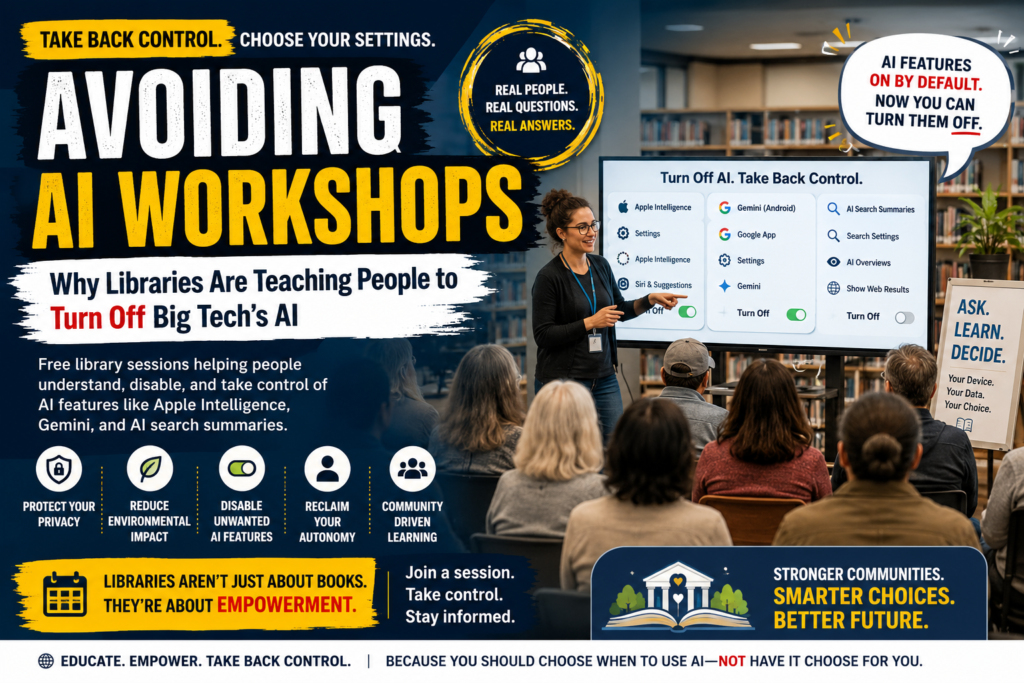
Avoiding AI workshops are free public library programs that teach patrons how to identify and disable AI features — like Apple Intelligence, Gemini, and AI-generated search summaries — that have been switched on across their phones, browsers, and apps by default. Born out of one librarian’s frustration in Maine, the idea has spread to libraries across the country and is now drawing crowds several times larger than typical tech-help sessions.
If you’ve ever wondered why your phone suddenly wants to summarize a one-line email, or why your search results are cluttered with AI overviews you never asked for, you’re exactly who these sessions are built for. This piece breaks down what the workshops actually teach, why they’ve become unexpectedly popular, and what the trend signals about the public’s relationship with AI in 2026.
What Are Avoiding AI Workshops?
Definition: Avoiding AI workshops are hour-long, in-person (and often livestreamed) library sessions that walk attendees through two things: a plain-language explanation of how consumer AI tools work, and a step-by-step, device-by-device tutorial for turning those tools off.
Expansion: The format was pioneered by Hannah Cyrus, a librarian at the Bangor Public Library in Maine, after she noticed a pattern in the reference questions she was fielding. Patrons weren’t asking how to use AI — they were asking how to make it stop interrupting them. Emails that summarized themselves, search bars that surfaced AI answers before a single blue link, assistants that offered to draft replies nobody requested: the questions all pointed toward the same underlying frustration.
Cyrus turned those recurring questions into a structured class, then published a journal article describing how she built it. That article set off a chain reaction: librarians from libraries around the world reached out asking to reuse her slides, and the concept began replicating in cities well beyond Maine. Cyrus has said she’s never had an experience quite like it — normally, nobody emails a librarian asking for a copy of an “Intro to Computers” lesson plan.
Unlike a typical introductory computer class, this kind of program isn’t about building new digital skills from scratch. It’s about reclaiming control over settings that were changed for users, not by them. That distinction is central to why the sessions resonate so strongly with attendees who feel like AI has been pushed into their daily lives without consent — and it’s a big part of why the format has traveled so quickly from one library system to the next.
Why Are Avoiding AI Workshops Going Viral?
The short answer: attendance numbers that libraries haven’t seen in years, driven by a mix of digital fatigue, privacy concerns, and environmental anxiety about AI infrastructure. What started as a modest tech-help session in Maine has become one of the most requested library programs in recent memory, and the demand shows no sign of slowing.
Frustration With Forced AI Adoption
Charlie Bailey, a librarian in South Philadelphia who adapted Cyrus’s model for his own branch, says the idea grew out of watching people react to AI tools being enabled by default rather than chosen deliberately. His session opens with an overview of how chatbots and AI features work, why someone might want to use them, and why someone might reasonably decide not to — before moving into hands-on instructions for disabling Apple Intelligence and Gemini directly on attendees’ phones.
The demand caught organizers off guard. Cyrus normally sees about a dozen people at her standard tech classes; her first session in this new format had to cap registration at 30 and add a waitlist and livestream, ultimately drawing roughly 70 attendees between the in-person and virtual audiences. Bailey’s library saw similar overflow, and a promotional Instagram post about his event pulled in thousands of likes and hundreds of shares — far outperforming the library’s usual social media engagement. He ended up scheduling a second session simply to work through the backlog of registrations.
Bailey has described the response as validating in a personal way. Seeing a room full of strangers share the same skepticism toward AI, he said, felt like discovering he wasn’t alone in a frustration he’d assumed was his own.
Privacy, Environmental, and Autonomy Concerns
Attendees at these sessions don’t describe themselves as anti-technology. They describe themselves as tired of not being asked. Concerns raised in workshop discussions include:
- Data center expansion near residential neighborhoods and its effect on local communities
- Environmental impact of AI infrastructure and energy consumption
- Workplace pressure to adopt AI tools that weren’t requested
- Loss of control over default settings on personal devices
- Distrust of Big Tech companies that build and profit from these products
One attendee framed the concern in very concrete terms: buying a home already requires jumping through years of financial hurdles, and now there’s the added anxiety that a data center could be built next door within a couple of years. Another attendee said the constant presence of AI at work leaves them thinking about its environmental footprint every time they see it pop up in a tool they didn’t choose.
Notably, several attendees say they support AI in narrower, opt-in contexts — such as medical research breakthroughs — while rejecting the blanket, always-on integration of AI into everyday consumer products. This is a key nuance: the pushback isn’t a rejection of the technology itself, but of how it’s being deployed by default, without a clear off switch and without much warning.
Inside an Avoiding AI Workshop: What Attendees Actually Learn
Each session follows a similar arc, regardless of which library is hosting it, even though the details are tailored to local audiences and the devices patrons actually bring in the door.
Part 1: How AI Tools Work
The session opens with plain-language context: what a chatbot is, what generative AI does with a prompt, and why companies are embedding these features into operating systems, browsers, and productivity apps. This grounding matters because most attendees aren’t AI experts — they’re patrons who just want their devices to work the way they expect, without having to become amateur software engineers to do it.
Part 2: Turning Features Off, Platform by Platform
The bulk of the hour is hands-on. Attendees pull out their own phones while the instructor projects step-by-step instructions for disabling AI features on major platforms, including settings for AI-powered assistants baked into mobile operating systems and search engines. Crowd-sourced tips get added to the mix too — one popular trick shared during a Philadelphia session involves appending a specific string of characters to a Google search URL to suppress AI-generated overviews in results. The instructor wrote the trick on a whiteboard, right next to the library’s Wi-Fi login credentials, for anyone to copy down.
Part 3: Open Discussion
The final stretch is often the most energizing part of the hour. Attendees swap frustrations and tips, and librarians say there’s a genuine sense of camaraderie in a room full of strangers who assumed they were the only ones annoyed by unsolicited AI features. For many, that shared exchange is as valuable as the technical instructions themselves — it turns a private annoyance into a public, collective conversation.
Who’s Behind the Avoiding AI Movement?
The trend traces back to two librarians whose independent frustrations turned into a shared curriculum:
- Hannah Cyrus (Bangor Public Library, Maine) — originated the format after fielding repeated patron questions about disabling AI; published the first public write-up describing the class in a library-science journal.
- Charlie Bailey (South Philadelphia library) — one of the many librarians who contacted Cyrus for her materials, then adapted and scaled the session locally, drawing viral social media attention in the process.
Both librarians frame the work as digital literacy, not activism. Their argument is that helping patrons understand and control the technology on their own devices is a core library function — the same mission that’s driven decades of computer literacy classes, just applied to a newer layer of software. Cyrus has pointed out that libraries have always been the place people turn to when a new piece of consumer technology becomes confusing or overwhelming, and this is simply the latest chapter of that role.
Avoiding AI Workshops vs. Traditional Digital Literacy Classes
| Feature | Avoiding AI Workshops | Traditional “Intro to Computers” Classes |
|---|---|---|
| Primary goal | Disable unwanted AI features | Build baseline digital skills |
| Typical attendance | 30–70+ per session (waitlisted) | ~10–15 per session |
| Format | In-person + livestream option | Usually in-person only |
| Tone | Reclaiming control, autonomy-focused | Skill-building, onboarding-focused |
| Content source | Crowd-sourced tips + librarian research | Standardized curriculum |
| Underlying driver | Frustration with default AI adoption | General tech literacy gaps |
| Virality potential | High — strong social media response | Low — routine programming |
The contrast in the table above helps explain why this particular library program has spread so quickly compared to other digital-skills offerings. It isn’t competing with existing classes for attention — it’s addressing a frustration that existing classes never touched.
Is Avoiding AI the Same as Being Anti-Technology?
No. Attendees and organizers of these library sessions consistently draw a distinction between rejecting AI outright and rejecting how it has been deployed. Cyrus, for instance, points to optical character recognition — a form of AI — as genuinely useful for digitizing old library documents. Workshop attendees have echoed similar nuance, saying they’re open to AI in fields like medical research even while resenting its unrequested presence in everyday apps.
The common thread isn’t opposition to AI as a category of technology. It’s a demand for consent, transparency, and control: the ability to decide, feature by feature, which AI tools are worth using and which aren’t. As Cyrus put it, the sense that a handful of companies wield outsized influence over how people use their own devices has been building for a long time — the arrival of AI as a default, hard-to-avoid feature may simply be the moment that frustration finally found an outlet.
Why This Trend Matters for Big Tech
The surge in interest around this format is a data point that AI companies and platform designers can’t easily dismiss. A handful of signals stand out:
- Default-on AI features are generating active backlash, not just quiet non-use. People are seeking out instructions to turn features off rather than simply ignoring them.
- Trust in Big Tech is a bigger driver than the technology itself. Concerns about data centers, energy use, and corporate influence are showing up alongside — and sometimes ahead of — concerns about AI accuracy or usefulness.
- Public institutions are stepping into the gap. Libraries, historically neutral, trusted spaces for tech education, are now positioning themselves as a counterweight to platform-level AI defaults.
- Demand is outpacing supply. Waitlists and overflow crowds suggest this isn’t a niche complaint — it’s a broadly shared frustration that hasn’t had a dedicated outlet until now.
For product teams and policymakers, the popularity of this format is worth watching closely: when people organize their free time around learning to opt out of a feature, that feature’s rollout strategy deserves a second look. It also raises a broader question about product design — namely, whether “AI-first” defaults are actually serving user preference, or simply assuming it.
How Librarians Can Start Their Own Program
Libraries interested in replicating the format don’t need to build a curriculum from scratch — Cyrus’s published journal article has already served as a template for dozens of adopters. A basic outline includes:
- Open with context. Spend the first 10–15 minutes explaining what AI tools are and how they work, without assuming prior technical knowledge.
- Present both sides. Explain why someone might want to use AI features, not just why they might not — this builds trust with the room and keeps the session from feeling one-sided.
- Go device by device. Walk through disabling AI assistants and AI-generated search results on the most common platforms your patrons actually use.
- Leave room for crowd-sourced tips. Some of the most useful tricks — like search-result modifiers — come from attendees, not slides.
- Cap registration and offer a livestream. Given how quickly these sessions have filled up elsewhere, plan for overflow from the very first offering.
- Document what you learn. Cyrus’s own experience shows that a single write-up of a successful session can spark adoption at libraries far outside your own system.
Library staff who have run these sessions also note a quieter benefit: the format gives reference librarians a structured way to answer a question they were already fielding one patron at a time, turning scattered one-on-one troubleshooting into a single, repeatable class.
What the Trend Says About the Broader AI Backlash
The library setting matters here. Unlike a tech blog or a social media thread, a public library carries an institutional neutrality that makes this kind of programming land differently. Patrons trust librarians precisely because they aren’t selling anything, and that trust appears to be a big part of why turnout has been so much higher than for other digital-skills classes. It also suggests the frustration driving this movement isn’t confined to a narrow, tech-savvy audience — it’s showing up in library branches serving everyday patrons of all ages and backgrounds.
Could This Trend Reach Your Local Library?
Given how organically the first avoiding AI workshop turned into a national pattern, it’s worth asking whether your own local library has plans to run one. Many library systems post upcoming programming on their websites or social media accounts, and a growing number are actively fielding requests from patrons who’ve heard about the format secondhand. If your branch hasn’t hosted an avoiding AI workshop yet, asking a reference librarian directly is often enough to get the idea onto the calendar — several of the librarians who reached out to Cyrus did so specifically because their own patrons kept asking.
It’s also worth noting that the format doesn’t require a large budget or specialized software. Because an avoiding AI workshop is built around settings patrons already have access to on their own devices, the main cost is staff time and a projector — which is part of why the idea has been so easy for libraries with limited programming budgets to adopt, and part of why it has traveled so far, so fast, from a single branch in Maine.
Frequently Asked Questions
What is this kind of library program? It’s a free, library-hosted class that teaches attendees how AI tools work and how to disable AI features on their phones, browsers, and apps.
Who started the trend? Hannah Cyrus, a librarian at the Bangor Public Library in Maine, created the original format after publishing a journal article about her experience; other librarians, including Charlie Bailey in Philadelphia, have since adapted it for their own communities.
Is this movement anti-technology? No. Organizers and attendees describe it as being about consent and control over AI defaults, not rejection of technology as a whole.
Why has interest grown so quickly? Frustration with AI features being enabled by default, plus concerns about data centers, energy use, and Big Tech’s influence, has driven attendance far beyond what libraries typically see for tech classes.
Can I attend one of these sessions online? Some libraries, including Bangor Public Library, have livestreamed their sessions to accommodate overflow demand, so check with your local branch about virtual options.
Will more libraries start offering this kind of class? Given how quickly the format has spread since Cyrus’s original journal article, and the level of interest librarians report from colleagues elsewhere, it’s reasonable to expect more branches to add similar sessions to their programming calendars.