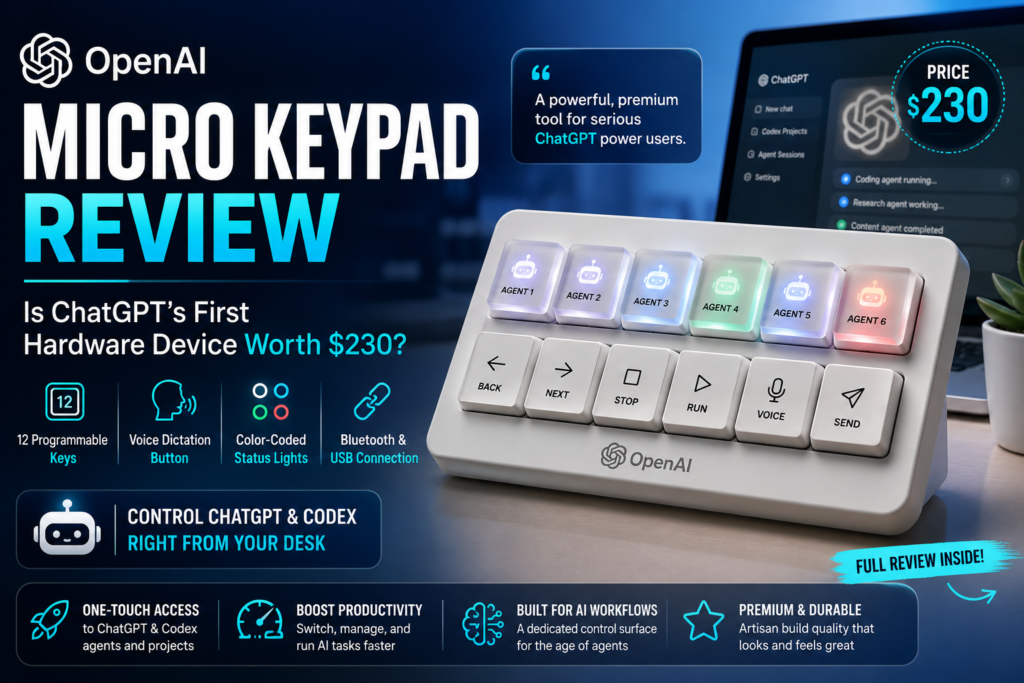
The OpenAI Micro keypad is a 12-key hardware accessory built to control ChatGPT and Codex directly from your desk, and the short answer is this: it’s a genuinely fun tool for heavy ChatGPT power users, but a hard sell for almost everyone else. Built in partnership with specialty keyboard maker Work Louder, the OpenAI Micro keypad marks the company’s first real step into consumer hardware — and it arrives wrapped in both intrigue and controversy.
This review breaks down exactly what the OpenAI Micro keypad does, how it performs in daily use, what it costs, and who should actually consider buying one.
What Is the OpenAI Micro Keypad?
The OpenAI Micro keypad is a compact, artisanal macropad designed to sit next to your regular keyboard and give you one-touch access to ChatGPT and Codex, OpenAI’s agentic coding tool. It connects to your computer over Bluetooth or a USB cable, and every key on the device can be programmed and customized from inside ChatGPT itself, through a dedicated “Micro” settings tab.
Unlike a traditional keyboard, the OpenAI Micro keypad isn’t meant for typing. It’s meant for directing — triggering pre-set AI agent tasks, switching between active ChatGPT sessions, and issuing voice commands without ever touching a mouse.
Definition: A macropad is a small, standalone keyboard accessory with a limited number of programmable keys, typically used to trigger shortcuts, macros, or app-specific commands. The OpenAI Micro keypad applies this familiar hardware format to AI agent workflows for the first time at consumer scale.
Design and Build Quality
The physical build of the OpenAI Micro keypad is one of its strongest points. It ships in a minimalist white box with a clean aesthetic that several early reviewers, including outlets covering the launch, have noted looks distinctly Apple-inspired. The device itself feels sturdy and substantial enough that even as a paperweight, it wouldn’t feel like a waste of $230.
The 12-Key Layout
The OpenAI Micro keypad is split into two functional rows:
- Six frosted “agent” keys on top, which can each be assigned to a specific ChatGPT or Codex task or project
- Six command keys below, used to control and navigate those active agent sessions
This layout is what separates the OpenAI Micro keypad from a generic programmable macropad — the top row isn’t just shortcuts, it’s a physical dashboard for juggling multiple AI agents at once.
Voice Dictation Button
Arguably the most practical feature of the OpenAI Micro keypad is its dedicated dictation button. Holding it down lets you speak a request directly to ChatGPT or Codex; tapping the adjacent send button submits it. For anyone who already talks through problems out loud, this turns the OpenAI Micro keypad into a genuinely fast way to hand off tasks without breaking flow to type.
Color-Coded Status Lights
Every key on the OpenAI Micro keypad lights up to reflect the state of its assigned agent:
| Light Color | Meaning |
|---|---|
| White | Agent is idle |
| Blue | Agent is actively thinking/working |
| Green | Task is complete |
| Red | An error has occurred |
This is a small but well-considered design choice. Once memorized, it lets you glance at the OpenAI Micro keypad and instantly know the status of every agent you have running — no need to alt-tab back into ChatGPT to check progress.
How the OpenAI Micro Keypad Performs in Daily Use
Does the OpenAI Micro keypad actually improve productivity? Yes, but only after a real learning curve, and only if you’re already deeply embedded in the ChatGPT and Codex ecosystem.
Setting up the OpenAI Micro keypad takes deliberate effort. You need to assign specific ChatGPT sessions or Codex projects to each of the six agent keys, memorize the four-color status system, and build muscle memory around the six command keys. That onboarding period is real — this isn’t a plug-and-play device.
Once configured, though, the experience reportedly becomes noticeably smoother. Toggling between multiple active AI projects with a single tap, combined with the voice dictation button, creates a workflow that’s faster than repeatedly clicking through browser tabs or app windows. For someone running several Codex coding agents in parallel, the OpenAI Micro keypad effectively becomes a physical control surface for an otherwise abstract, screen-bound process.
The core tension, though, is unavoidable: why learn a new piece of hardware when your existing mouse and keyboard already do the job? For casual or infrequent ChatGPT users, that question doesn’t have a compelling answer. The OpenAI Micro keypad only starts paying for itself once AI agents are a constant, daily part of your workflow — not an occasional tool.
OpenAI Micro Keypad vs. Other Input Devices
Here’s how the OpenAI Micro keypad stacks up against comparable options on the market.
| Feature | OpenAI Micro Keypad | Generic DIY Macropad | Standard Keyboard Shortcuts |
|---|---|---|---|
| Price | ~$230 | $20–$80 | Free (built-in) |
| AI agent integration | Native, built for ChatGPT/Codex | None (manual scripting required) | None |
| Voice dictation button | Yes, dedicated | No | Varies by OS |
| Status indicator lights | Yes, 4-color agent states | Rare, DIY-dependent | No |
| Learning curve | Moderate to steep | Steep (requires programming) | Minimal |
| Target user | ChatGPT/Codex power users | Hobbyist tinkerers | General users |
| Portability | Compact, USB/Bluetooth | Varies | N/A |
This comparison highlights the central trade-off with the OpenAI Micro keypad: it offers deeper native AI integration than any DIY alternative, but at a meaningfully higher price point, and with a narrower use case than a standard keyboard.
Pricing and Value: Is $230 Justified?
At $230, the OpenAI Micro keypad sits well above typical macropads, most of which range from $20 to $80 depending on key count and build quality. That price gap has drawn sharp criticism from parts of the tech press and coding community, with independent reviewers arguing the OpenAI Micro keypad is difficult to justify next to cheaper DIY and off-the-shelf alternatives that can be configured to do similar things with enough manual setup.
Is the OpenAI Micro keypad worth the price? For most people, no — the value only becomes clear if you’re a frequent, paying ChatGPT or Codex user who runs multiple AI agents simultaneously and wants a dedicated physical control surface for them. For casual users, the price tag buys polish and brand integration, not core functionality you couldn’t otherwise get for free with existing keyboard shortcuts.
Community and Critical Reception
Reception to the OpenAI Micro keypad has been mixed to negative, particularly among the serious coders it was ostensibly designed for. On Reddit, some users have dismissed it outright, with one commenter calling it more of a novelty than a real product. Independent outlet Aftermath was especially critical in its own review, taking issue with the price relative to cheaper alternatives available on the market.
This response matters for anyone evaluating the OpenAI Micro keypad: the device’s target audience — hardcore coders using Codex daily — has not embraced it as enthusiastically as OpenAI may have hoped. That disconnect suggests the OpenAI Micro keypad currently appeals more to AI enthusiasts and gadget collectors than to the professional developer crowd it was marketed toward.
Context: OpenAI’s Broader Hardware Push
The OpenAI Micro keypad isn’t happening in isolation. It’s launching amid a turbulent stretch for OpenAI’s hardware ambitions:
- Apple filed a lawsuit against OpenAI over alleged trade secret theft related to hardware development
- Reports have surfaced of a second, more ambitious OpenAI hardware product — a screenless, mobile smart speaker reportedly developed by former Apple engineers
- The OpenAI Micro keypad is, for now, the only tangible hardware product OpenAI has actually shipped to the public
That context is useful for understanding why the OpenAI Micro keypad exists at all. It reads less like a flagship product and more like an early, lower-stakes test of whether OpenAI’s brand and AI integration can succeed in physical hardware — ahead of bigger devices still in development.
Who Should Buy the OpenAI Micro Keypad?
Based on real-world use, the OpenAI Micro keypad makes the most sense for a fairly narrow group of buyers.
Good fit for:
- Daily, heavy ChatGPT or Codex users running multiple AI agent sessions at once
- Developers who want a dedicated physical dashboard for agent status tracking
- Tech enthusiasts who enjoy premium, artisanal desk hardware regardless of strict utility
- Anyone who already relies on voice dictation as part of their workflow
Poor fit for:
- Casual or occasional AI tool users
- Budget-conscious buyers who could achieve similar results with free keyboard shortcuts
- Coders who prefer minimal, distraction-free setups
- Anyone unwilling to invest time in the onboarding and memorization curve
Frequently Asked Questions
What is the OpenAI Micro keypad used for? The OpenAI Micro keypad is used to control and switch between ChatGPT and Codex AI agent sessions using physical keys, plus a dedicated voice dictation button, instead of navigating everything through a browser or app window.
How much does the OpenAI Micro keypad cost? The OpenAI Micro keypad costs $230, positioning it well above typical macropads and programmable keyboard accessories.
Does the OpenAI Micro keypad work with a Mac or PC? Yes. The OpenAI Micro keypad connects via Bluetooth or a USB cable, making it compatible with most modern desktop and laptop setups regardless of operating system.
Is the OpenAI Micro keypad only for coders? It’s primarily marketed to coders using Codex, but its ChatGPT session-switching and dictation features can also appeal to any heavy AI power user, not just developers.
What do the different light colors on the OpenAI Micro keypad mean? White indicates an idle agent, blue means the agent is actively working, green signals task completion, and red flags an error — all visible at a glance without opening ChatGPT.
Final Verdict
The OpenAI Micro keypad is a well-built, thoughtfully designed piece of hardware that delivers real utility for a specific type of user: someone deeply embedded in daily ChatGPT and Codex workflows who wants a physical control layer for multiple AI agents. For that person, the OpenAI Micro keypad can genuinely streamline how they manage AI-driven work.
For everyone else, the $230 price tag and steep learning curve are hard to justify next to the mouse and keyboard already sitting on your desk. As OpenAI’s first hardware release, the OpenAI Micro keypad feels less like a mass-market essential and more like an early signal of where the company wants to take physical AI interfaces next.