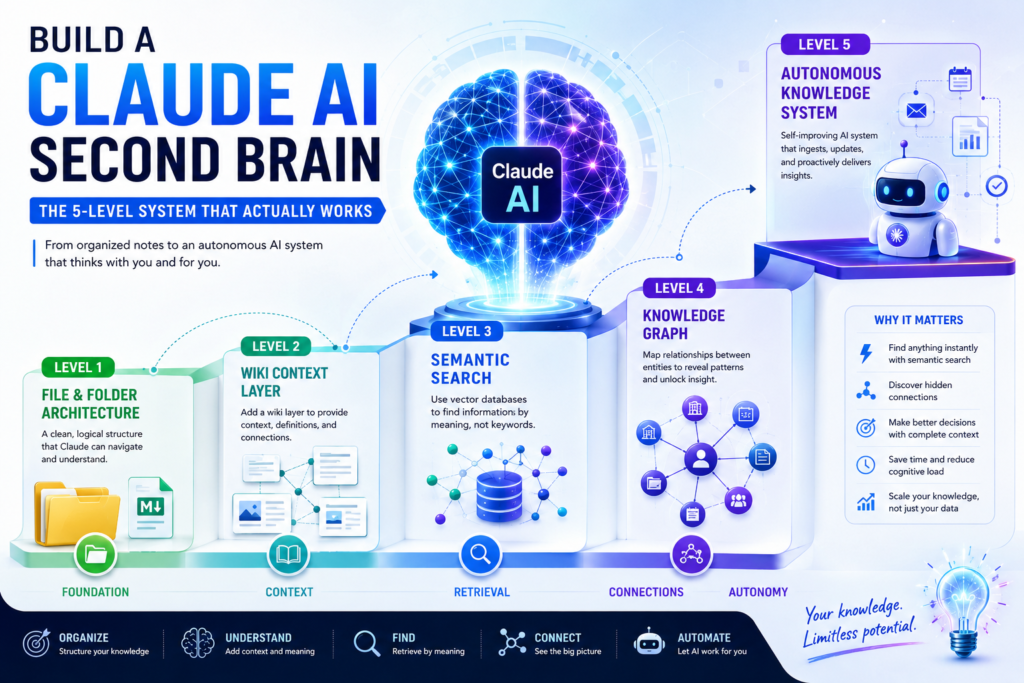
You’re drowning in notes, browser tabs, and unprocessed ideas — a Claude AI second brain fixes that by turning scattered information into a living, searchable knowledge system. This guide walks you through every level of that system, from a simple folder structure to a fully autonomous AI that manages your knowledge without manual effort.
What Is a Claude AI Second Brain?
A Claude AI second brain is a structured, AI-augmented system for storing, organizing, and retrieving information in a way that reduces cognitive load and amplifies decision-making. It acts as an external extension of your memory — one that never forgets, never loses a document, and can surface exactly what you need in seconds.
The concept builds on Tiago Forte’s “Building a Second Brain” methodology, but upgrades it fundamentally. Instead of a passive archive you manually curate, a Claude-powered knowledge system actively processes your inputs, finds connections across your data, and retrieves information based on meaning — not just keywords.
Why Traditional Note-Taking Apps Fall Short
Tools like Notion, Obsidian, and Evernote are excellent at storage. They are poor at retrieval under pressure. When you need something fast, keyword search fails if you don’t remember the exact phrase you used. You end up re-researching things you already knew.
A Claude AI second brain solves this with semantic understanding. Ask it a question in plain language, and it surfaces the right answer even if your notes use completely different wording. That shift — from storage to intelligent retrieval — is the entire point.
The 5 Levels of a Claude AI Second Brain
Building an effective AI knowledge management system is not a single-step process. It progresses through five distinct levels, each one unlocking new capabilities while preserving everything built before it. Most people never move past Level 1 or 2, which is why their systems eventually collapse under their own weight.
Level 1 – File and Folder Architecture
Definition: The foundation layer. At Level 1, you create a logical, navigable folder hierarchy that Claude can traverse to find information quickly.
This is deceptively important. A messy file system doesn’t just inconvenience you — it limits what Claude can do. AI models work best when data has predictable structure. Flat folders with generic names like “Misc” or “Random” are invisible to intelligent retrieval.
What to do at Level 1:
- Design a folder hierarchy that mirrors how you think, not how files happen to arrive
- Use consistent, descriptive file names (e.g.,
2026-06-meeting-Q3-strategy.mdnotnotes1.txt) - Separate evergreen content (reference material that stays relevant for years) from transient content (project-specific files with a short lifespan)
- Create a
/Inboxfolder for unprocessed inputs and a scheduled review habit to sort them weekly - Use plain Markdown
.mdfiles wherever possible — they are lightweight, portable, and natively readable by Claude
The goal here is not perfection. It is predictability. Claude performs better when it can anticipate where a certain type of information lives.
Level 2 – Wiki-Based Context Layers
Definition: At Level 2, you add a wiki layer — a structured index that groups related documents, defines key terms, and builds connections between ideas.
Think of the wiki as a table of contents for your brain. Instead of diving directly into raw files, Claude first reads the wiki to understand the context of your knowledge base: what projects exist, how concepts relate, what vocabulary you use.
This layer dramatically improves retrieval accuracy. Without context, Claude has to infer relationships from file names and content alone. With a wiki, those relationships are declared — making the system far more reliable.
How to build your wiki layer:
- Create a master index file (e.g.,
README.mdor_WIKI.md) at the root of your knowledge base - For each major project or topic, write a 3–5 sentence “context block” explaining what it is and why it matters
- Cross-link related files using standard Markdown links
- Define your own terminology — especially jargon, project names, or internal acronyms Claude wouldn’t know by default
The wiki layer turns your Claude AI second brain from a filing cabinet into a coherent knowledge base with a navigable structure.
Level 3 – Semantic Search with Vector Databases
Definition: Level 3 introduces vector databases, which enable semantic search — retrieving information based on meaning and context rather than exact keyword matches.
This is where a Claude AI second brain begins to feel genuinely intelligent. Vector databases (such as Pinecone, Weaviate, Chroma, or Qdrant) convert your documents into high-dimensional numerical representations called embeddings. When you ask a question, the system finds the chunks of content whose embeddings are mathematically closest to your query — even if none of your documents use the exact words you asked with.
Why this matters in practice:
Imagine you wrote a note six months ago about “reducing customer friction at checkout.” Later you ask your second brain about “e-commerce conversion problems.” A keyword search finds nothing. A semantic search finds that note instantly, because the meaning of both phrases overlaps significantly.
What to implement at Level 3:
- Choose a vector database suited to your scale (Chroma for local/personal use, Pinecone or Weaviate for team-level deployments)
- Chunk your documents intelligently — 200 to 500 token chunks with a 20% overlap preserve context at retrieval time
- Store metadata alongside each chunk (source file, date created, topic tags) so results can be filtered beyond pure semantic similarity
- Build a retrieval pipeline that passes the top-matched chunks into Claude’s context window alongside your query
Level 3 is the architectural leap that separates a casual note-taking setup from a true AI-powered knowledge base. It’s also where integration complexity increases, so it’s worth pausing here and ensuring Levels 1 and 2 are solid before proceeding.
Level 4 – Knowledge Graphs for Pattern Recognition
Definition: A knowledge graph maps explicit relationships between entities in your data — people, projects, ideas, decisions — so that Claude can reason across your knowledge base, not just retrieve from it.
Where vector databases answer “what is similar to this?”, knowledge graphs answer “how is this connected to that?” These are fundamentally different questions, and the best Claude AI second brain setups use both in tandem.
A knowledge graph might reveal, for example, that three separate projects you’re running all depend on the same vendor — a risk pattern that would never surface from a simple search. Or it might show that every time a certain client appears in your notes, project delays follow — a pattern worth surfacing proactively.
How to build a basic knowledge graph:
- Use tools like Obsidian’s graph view, Neo4j, or a structured JSON-LD schema to define entities and their relationships
- Tag entities consistently across all notes (e.g., always use
[[Client: Acme Corp]]rather than variations like “Acme” or “the Acme project”) - Establish relationship types:
DEPENDS_ON,BLOCKED_BY,RELATES_TO,CONTRADICTS— these enable nuanced reasoning - Feed the graph structure into Claude’s context window during complex analytical queries
At this level, your Claude AI second brain stops being a retrieval tool and starts functioning more like a research analyst — one that actively surfaces connections you didn’t know to look for.
Level 5 – Fully Autonomous Knowledge Systems
Definition: At Level 5, your second brain operates independently. It continuously ingests new information, updates itself, removes stale data, and surfaces insights without requiring manual prompts.
This is the frontier. Tools like autonomous agents built on Claude’s API, combined with scheduled workflows, can monitor incoming data streams (emails, calendar events, research feeds, meeting transcriptions) and route each piece into the right layer of your knowledge system automatically.
What a Level 5 system does:
- Auto-transcribes and summarizes meetings, then files insights by project and entity
- Detects when a piece of evergreen content becomes outdated and flags it for review
- Proactively pushes relevant knowledge to you before a scheduled meeting or deadline
- Maintains knowledge hygiene by archiving or deleting transient data after a defined lifespan
Reaching Level 5 requires a solid implementation of Levels 1–4, meaningful automation tooling (n8n, Make, Zapier, or custom scripts), and ongoing calibration. Most individual users find their optimal operating point at Level 3 or 4. Level 5 is most valuable — and most sustainable — for teams or organizations managing high-volume knowledge environments.
Which Level Is Right for You?
Not everyone needs a Level 5 autonomous system on day one. The table below maps each level to the user type, tools required, and time investment needed to implement it.
| Level | System Name | Best For | Core Tools | Setup Time |
|---|---|---|---|---|
| 1 | File & Folder Architecture | Everyone starting out | Markdown, file system | 2–4 hours |
| 2 | Wiki Context Layer | Individuals with active projects | Markdown + index files | 4–8 hours |
| 3 | Semantic Search | Power users, researchers | Vector DB (Chroma/Pinecone) + Claude API | 1–3 days |
| 4 | Knowledge Graph | Analysts, strategists, teams | Neo4j / Obsidian Graph + structured tagging | 1–2 weeks |
| 5 | Autonomous System | Organizations, agencies, high-volume teams | Agent framework + automation tools | Ongoing |
Which level should you start at? Start at Level 1 and progress only when the current level creates a bottleneck. Jumping to Level 3 before your folder structure is stable is a common and costly mistake — the vector database will ingest chaos and return chaos.(Claude knowledge management AI second brain Semantic search with Claude AI knowledge management system)
Core Tools You Need to Build Each Level
Building a Claude AI second brain does not require a massive tech stack. The right tools, chosen deliberately, are more effective than a bloated system of overlapping apps.
Recommended toolkit by function:
- Document format: Markdown (
.md) files — universal, lightweight, version-control-friendly - Wiki layer: Obsidian (local) or Notion (collaborative) for cross-linking and index management
- Vector database: Chroma (free, local-first) for personal use; Pinecone or Weaviate for scalable team deployments
- Knowledge graph: Obsidian Graph View (visual), Neo4j (queryable), or structured JSON-LD schemas
- Automation: n8n (self-hosted), Make, or Zapier for routing new inputs into the correct layer
- AI layer: Claude via API or Claude.ai Projects for querying, summarizing, and reasoning across your data
- Data extraction: Structured prompting techniques (asking Claude to extract entities, dates, decisions, and action items from raw transcripts or documents)
The most important tool choice is your document format. Markdown wins on portability, compatibility, and longevity — your notes will be readable in any future system without conversion.
Common Mistakes That Kill Your Second Brain
Most Claude AI second brain setups fail not because of bad tooling, but because of predictable structural errors that compound over time.
The five most damaging mistakes:
- Overloading the system with everything. Your second brain should not be a digital attic. If a piece of information doesn’t serve a clear, current purpose, don’t ingest it. Noise degrades retrieval quality across every level.
- Skipping the wiki layer. Users who jump from Level 1 directly to vector databases often find that Claude retrieves technically relevant chunks but has no understanding of how those chunks relate to each other. Context matters.
- Using inconsistent naming conventions. If the same client appears as “TechCorp,” “Tech Corp Inc.,” and “the TC project” across your notes, your knowledge graph becomes fragmented and semantic search returns incomplete results.
- Neglecting evergreen vs. transient separation. Mixing long-term reference material with short-lived project notes causes your system to return outdated information with the same confidence as current facts.
- Building for the tool, not the workflow. The most sophisticated system is worthless if it doesn’t fit how you actually work. Design the second brain around your existing cognitive habits, then introduce friction only where it serves a purpose.
How to Implement a Claude AI Second Brain for Teams
A team-level Claude AI second brain introduces new complexity: multiple contributors, inconsistent habits, and conflicting organizational taxonomies. The technical challenges are real, but the organizational challenges are harder.
Align on a shared taxonomy before building
Before touching any tooling, get alignment on how your team names and categorizes things. A shared glossary document — defining what counts as a “project,” a “client,” a “deliverable,” and an “insight” — is the single most valuable pre-work investment a team can make.
Prioritize contribution habits over technical features
A sophisticated system that no one updates is worse than a simple system everyone maintains. When rolling out a team second brain:
- Start with a two-week pilot using only Levels 1 and 2
- Make contribution as frictionless as possible — one-click capture, a shared Inbox folder, and a weekly team review session
- Focus onboarding on the why (reduced duplicate research, faster onboarding of new members) rather than the how (the technical architecture)
Address privacy before scaling
Teams handling sensitive client data, financial records, or proprietary research need to evaluate whether cloud-based vector databases and AI APIs align with their data governance requirements. Local-first alternatives — Ollama for local LLM inference, Chroma running on-premises, Obsidian Vault in a private repository — offer a path to a fully private AI-powered knowledge base without sacrificing capability.
Frequently Asked Questions
What is a Claude AI second brain? A Claude AI second brain is a structured knowledge management system that uses Claude’s AI capabilities to store, organize, and intelligently retrieve information. It reduces cognitive load by offloading memory and information-finding tasks to an AI layer, letting you focus on higher-value thinking.
Do I need coding skills to build a Claude AI second brain? Not for Levels 1 and 2. Basic folder organization and Markdown wiki creation require no code. Level 3 (vector databases) and above benefit significantly from basic Python or JavaScript knowledge, though no-code integration tools like n8n or Make can handle many workflows without writing code directly.
What is the difference between a second brain and a knowledge base? A knowledge base is a static repository — documents you can search. A Claude AI second brain is dynamic — it retrieves by meaning, surfaces connections, and (at higher levels) updates autonomously. The distinction is active vs. passive information management.
How many documents can a Claude AI second brain handle? Level 1 and 2 systems work well up to a few thousand documents. Vector database implementations at Level 3 can handle hundreds of thousands of document chunks with no significant performance degradation, making them suitable for both individual and enterprise-scale deployments.
Is a Claude AI second brain private? It depends on your implementation. Using Claude.ai’s Projects feature or the Claude API sends data to Anthropic’s servers. For fully private deployments, local models (via Ollama) combined with on-premises vector databases and Obsidian Vault provide a completely offline, air-gapped knowledge system.
What is the best first step for someone completely new? Open a folder, create five subfolders that match your five most active areas of work or life, and move your most-used notes into them. Then write a 200-word README.md explaining what each folder is for. You have just built Level 1 of your second brain. That’s the right place to start.
Summary: The 5 Levels at a Glance
A well-built Claude AI second brain progresses through five architectural layers, each multiplying the intelligence and usefulness of the last:
- Level 1 establishes a logical, navigable file structure — the irreplaceable foundation
- Level 2 adds a wiki layer that gives Claude the context it needs to understand relationships
- Level 3 introduces semantic search via vector databases, enabling meaning-based retrieval
- Level 4 maps entity relationships through knowledge graphs, enabling pattern recognition
- Level 5 automates ingestion, updates, and proactive surfacing — removing manual maintenance entirely
The path from Level 1 to Level 5 is not linear for everyone. Most individuals find their equilibrium at Level 3 or 4. Most teams benefit most from a disciplined Level 2 with selective Level 3 augmentation. What matters is not the sophistication of the system — it’s whether the system makes you faster and sharper than you were without it.