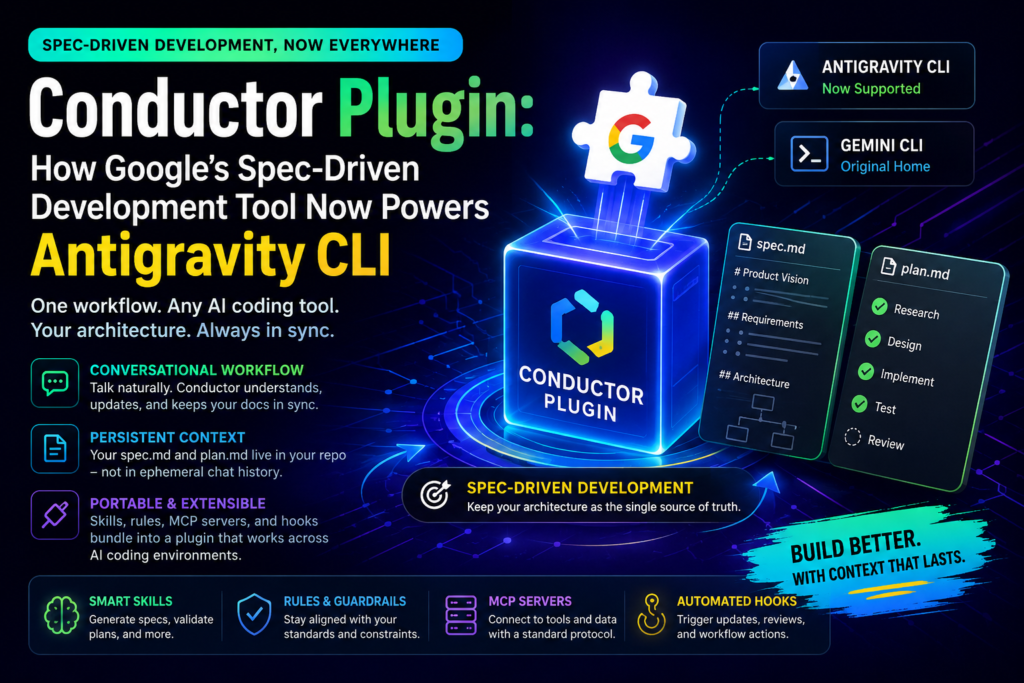
Google’s Conductor Plugin lets developers manage Spec-Driven Development through natural conversation instead of rigid commands, and it now works across multiple AI coding tools, including Antigravity CLI. That single change turns a tool that used to be locked to one interface into a portable, ecosystem-wide capability that keeps your architecture specs as the single source of truth no matter which AI assistant you happen to be chatting with today.
If you’ve ever watched an AI coding session go sideways because the assistant forgot why a feature existed three prompts ago, this update is aimed squarely at you. Below, we break down what changed, why Google built it this way, how the underlying workflow actually functions, and how to get it running in your own projects.
What Is the Conductor Plugin?
The Conductor Plugin is Google’s evolution of Conductor, a tool originally built as a Gemini CLI extension to bring Spec-Driven Development (SDD) into the terminal. Instead of letting project context live and die inside ephemeral chat logs, this system persists that context in version-controlled Markdown files — namely spec.md and plan.md — that your AI agent reads and updates as you build.
The core idea is simple: your repository, not your chat history, should be the single source of truth for what your software is supposed to do and how it’s supposed to get there.
Definition: a “plugin” in this context bundles together skills, rules, MCP (Model Context Protocol) servers, and hooks into one installable package. Expansion: that packaging is what allows the newly rebuilt tool to move beyond Gemini CLI and integrate with other agentic coding environments, including Antigravity CLI, without developers having to rebuild their spec-driven workflow from scratch in each new tool they adopt.
Why Google Rebuilt Conductor as a Plugin
Conductor launched as a way to fix a specific problem: AI coding assistants tend to lose track of why a project looks the way it does. A developer might explain an architectural decision in one prompt, only for the assistant to contradict that decision two sessions later because nothing was written down anywhere persistent. The original Gemini CLI extension solved this by anchoring context in Markdown files that lived alongside the code.
That approach worked, but it had a ceiling. Because it was built as an extension, it only functioned inside Gemini CLI. Teams that used multiple AI coding tools — which is increasingly common as developers mix and match assistants for different tasks — couldn’t carry their spec-driven context between environments. Rebuilding the tool as a plugin, bundling skills, rules, MCP servers, and hooks together, removed that ceiling. It also gave Google room to make the interaction model conversational rather than command-based, which lowers the learning curve for teams adopting Spec-Driven Development for the first time.
From Gemini CLI Extension to Plugin: What Changed
The original extension worked well, but it tied Spec-Driven Development to one specific tool and required developers to learn a set of strict commands to move through the SDD process step by step.
The rebuilt version removes that friction. Rather than issuing precise commands to generate a spec or update a plan, you simply talk to your AI assistant about what you’re building. It listens, infers intent, and updates the underlying Markdown artifacts on your behalf — checking off completed plan items, refining specs, and keeping context current without you managing any of that bookkeeping by hand.
Skills, Rules, MCP Servers, and Hooks Explained
Four components work together to make this possible:
- Skills — reusable capabilities the AI agent can invoke during a session, such as generating a spec section from a rough feature description or validating a plan against existing code.
- Rules — the guardrails that keep the agent aligned with your project’s architecture, coding standards, and constraints, so it doesn’t propose solutions that clash with decisions you’ve already made.
- MCP servers — Model Context Protocol servers that let the system connect to external tools and data sources in a standardized way, rather than requiring custom integration code for every service.
- Hooks — triggers that fire at specific points in the development workflow, such as automatically updating
plan.mdwhen a task is marked complete, or flagging a spec for review when it hasn’t been touched in a while.
Bundling these four pieces is what separates a simple CLI extension from a true plugin architecture, and it’s the technical foundation that makes the whole system portable across tools rather than locked to one.
How Spec-Driven Development Works With Conductor
Question: What is Spec-Driven Development? Direct answer: Spec-Driven Development is a workflow where you define a project’s architecture, requirements, and implementation plan in structured documents before writing code, so both human developers and AI agents share a persistent, unambiguous reference point throughout the build process.
With this system in place, that workflow now happens conversationally. You describe a feature you want to build, and the assistant dynamically generates or updates the relevant spec and plan content in the background. You still end up with the same rigorous, version-controlled Markdown files SDD depends on — the difference is that producing them no longer requires manual command sequences.
Persistent Markdown Artifacts: spec.md and plan.md
Two files anchor every workflow built on this system:
spec.md— captures the “what” and “why” of a feature: requirements, constraints, and architectural decisions.plan.md— captures the “how”: a task-by-task implementation roadmap the AI agent works through and checks off as it goes.
Because these files live in your repository rather than in a chat window, they survive across sessions, across tools, and across team members. That persistence is the entire point — context that doesn’t evaporate when you close a terminal tab or switch which assistant you’re talking to.
Conductor Plugin vs. Traditional AI Coding Workflows
The table below compares a typical unstructured AI coding session against one run through this spec-driven system.
| Aspect | Traditional AI Chat Workflow | Conductor Plugin Workflow |
|---|---|---|
| Context storage | Lives in ephemeral chat history | Persisted in version-controlled spec.md / plan.md |
| Continuity across tools | Context lost when switching tools | Portable across Antigravity CLI, Gemini CLI, and others |
| Interaction style | Freeform prompting, no structure | Conversational, but backed by procedural SDD rigor |
| Task tracking | Manual, easy to lose track | Automatically updated plan checkboxes |
| Team visibility | Limited to the chat log’s owner | Shared via the repository, visible to the whole team |
| Onboarding a new tool | Requires re-explaining project context from scratch | Existing specs and plans carry over automatically |
| Command complexity | N/A (unstructured) | Backwards-compatible with prior Conductor commands |
This comparison highlights why the update matters beyond convenience: it addresses the structural weaknesses — lost context, fragmented tooling, and invisible progress — that make ad hoc AI coding sessions hard to trust at scale, especially on larger codebases with multiple contributors.
Conductor for Antigravity CLI: Cross-Tool Portability
Until this update, Conductor only worked inside Gemini CLI. Turning it into a plugin changes that. The Conductor Plugin now supports Antigravity CLI, meaning an AI-assisted workflow you start in one tool can continue in another without losing any project context.
In practice, this means your spec.md and plan.md files act as a shared configuration layer. Whichever tool you’re using — Antigravity CLI, Gemini CLI, or another supported assistant — the AI agent reads the same architectural guidelines and goals, so the underlying behavior stays consistent regardless of which interface sits in front of you.
Can I Use It With Claude or Other Tools?
Question: Does the Conductor Plugin work with tools beyond Antigravity CLI and Gemini CLI? Direct answer: Yes — the plugin architecture is designed for portability, and Google has indicated the goal is for teams to use it in whichever tool fits the task at hand, including Claude and other AI coding assistants, without losing shared context.
A Practical Example: Adding a Feature Across Two Tools
Consider a team building a checkout flow. A developer starts the day in Antigravity CLI, describing a new discount-code feature in plain language. The assistant drafts a spec.md section covering validation rules, edge cases, and how discounts interact with existing pricing logic, then generates a plan.md with a short sequence of implementation tasks.
Later that afternoon, a teammate picks up the same task from Gemini CLI instead. Because the spec and plan files live in the repository rather than in either developer’s chat history, the second developer’s assistant already understands the discount-code requirements, the constraints already agreed on, and which tasks are already checked off. Nobody has to re-explain the feature from scratch, and nothing gets implemented in a way that contradicts what was decided that morning. That continuity — not any single feature — is the practical payoff of this approach.
Key Benefits for Development Teams
Adopting this workflow brings a handful of concrete advantages over ad hoc, chat-based AI development:
- Backwards compatibility — existing Conductor commands, plans, and specs continue to work without modification.
- Natural interaction — teams spend less time memorizing command syntax and more time discussing actual implementation strategy.
- Portability — developers can move between Antigravity CLI, Gemini CLI, and other supported tools mid-project without losing context.
- Preserved context — the repository remains the single source of truth, even as the interaction layer becomes more conversational.
- Stronger task completion — Google reports higher success rates on the most complex subset of TerminalBench tasks compared with development done without Spec-Driven Development.
- Lower onboarding friction — new team members (and new AI tools) can read
spec.mdandplan.mdto get up to speed instead of relying on tribal knowledge.
For teams juggling multiple AI coding tools across a codebase, portability alone can be reason enough to adopt this workflow — it removes the “which tool has the context” problem entirely.
Who Should Consider Adopting This Workflow
Spec-Driven Development isn’t strictly necessary for every project, so it’s worth being clear about where this tool fits best:
- Teams using more than one AI coding assistant. If your developers split time between Antigravity CLI, Gemini CLI, or other tools, portability alone solves a real daily headache.
- Projects with complex, evolving architecture. The more a codebase’s design decisions need to be remembered and respected over time, the more value persistent specs provide.
- Distributed or asynchronous teams. Shared, version-controlled context reduces the amount of re-explaining needed when contributors pick up work at different times.
- Solo developers on long-running projects. Even without a team, persistent specs prevent an AI assistant from “forgetting” earlier architectural decisions across sessions.
Smaller, short-lived scripts or prototypes may not need this level of structure — the overhead of maintaining specs is best justified by projects with some staying power.
It’s also worth noting that adoption doesn’t have to be all-or-nothing. A team can start by writing a spec.md for just the trickiest feature in a sprint — the one most likely to get reinterpreted differently by different contributors — and expand from there once the workflow proves useful. That incremental path tends to build buy-in faster than mandating structured specs across an entire codebase on day one.
Common Considerations Before Adopting
A few practical points are worth weighing before rolling this out across a team:
- Spec quality still depends on input quality. Conversational generation lowers friction, but vague feature descriptions still produce vague specs; clearer conversations produce more useful
spec.mdfiles. - Team habits need to adjust. Developers accustomed to purely ad hoc prompting may need a short adjustment period before persistent specs feel like a help rather than a formality.
- Tool support will keep expanding. Antigravity CLI support is new as of this release, so teams relying on other tools should check current compatibility before assuming full portability.
How This Fits Into the Broader Agentic Coding Landscape
The shift toward plugin-based tooling reflects a wider trend in AI-assisted development: the interface a developer types into matters less than the persistent context layer underneath it. Whether a team standardizes on Antigravity CLI, Gemini CLI, or eventually adds other assistants into the mix, the value of Spec-Driven Development comes from the discipline of writing decisions down, not from any single tool’s command syntax.
That’s also why the MCP (Model Context Protocol) piece of the architecture matters more than it might seem at first glance. Standardizing how an AI agent connects to external context — repositories, issue trackers, documentation — means future tools can plug into the same spec-and-plan foundation without Google (or any other vendor) having to build one-off integrations for every new assistant that comes along. In that sense, this release is less a single-feature announcement and more a signal about where structured AI coding workflows are headed industry-wide.
How to Get Started With the Conductor Plugin
Getting started doesn’t require abandoning any existing Conductor setup. The plugin is built to sit on top of your current specs and plans, so migration is largely seamless.
Google also published a hands-on Codelab for developers who want to explore the plugin’s conversational features before rolling it into a live project.
Installing Conductor for Antigravity CLI
To integrate it with Antigravity CLI specifically, run:
agy plugins install https://github.com/gemini-cli-extensions/conductor
For general installation across other supported tools, the plugin is available directly from its GitHub repository, where setup instructions and the latest updates are maintained.
Frequently Asked Questions
Is the Conductor Plugin free to use? It’s distributed as an open-source plugin via GitHub, so there’s no separate licensing cost to install it — standard usage costs for the underlying AI tool, such as Gemini CLI or Antigravity CLI, still apply.
Do I need to rewrite my existing specs to use it? No. Backwards compatibility is a core design goal, meaning your existing spec.md and plan.md files and prior Conductor commands continue to function unchanged.
What’s the difference between spec.md and plan.md? spec.md documents the requirements and architectural reasoning behind a feature, while plan.md breaks that feature into a trackable, checkable implementation roadmap.
Why does portability across tools matter for Spec-Driven Development? Because AI-assisted development increasingly spans multiple tools and team members, portability ensures nobody has to re-explain project context every time they switch interfaces.
Does switching to a conversational interface reduce the rigor of Spec-Driven Development? No — the conversational layer changes how specs and plans get created and updated, not the underlying discipline of maintaining version-controlled, persistent documentation as the source of truth.
Conclusion
The move from a single-tool extension to a full plugin marks a meaningful shift in how Spec-Driven Development gets practiced day to day. By keeping spec.md and plan.md as persistent, version-controlled artifacts while making the interaction layer conversational, it gives teams the best of both worlds: architectural rigor without command-line friction. With support for Antigravity CLI now in place, and portability to other tools clearly on the roadmap, the Conductor Plugin is positioned to become a standard layer for any team serious about disciplined, AI-assisted software development.