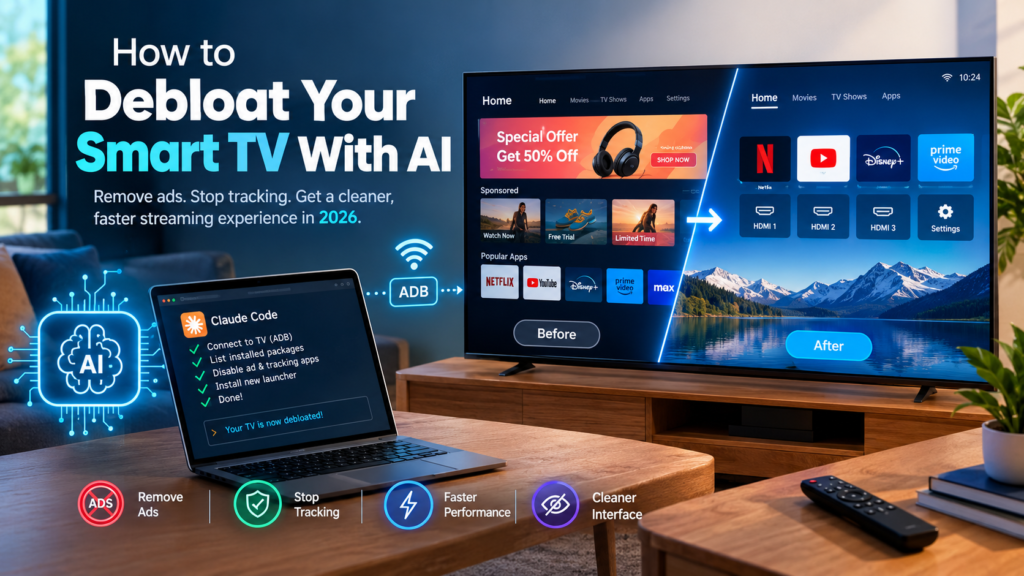
You can debloat your smart TV in a single afternoon by pointing an AI coding agent, such as Claude Code, at it over your home Wi-Fi. On Android TV and Google TV models, the agent uses Android Debug Bridge (ADB) to disable ad and tracking packages. It can also swap the sponsored home screen for a lightweight launcher, all without root access.
You know the routine. You power on the TV, wait for the interface to crawl into view, scroll past a sponsored banner, and only then reach Netflix. In mid-October 2026, thousands of owners decided they had had enough, and an AI-assisted fix spread across social media in roughly two days, as TechCrunch reported on October 19, 2026. This guide explains how AI smart TV debloating works, which sets support it, what can go wrong, and what to keep before you debloat your smart TV.
Key takeaways
- Android TV ADB cleanup works on most Android TV and Google TV sets from brands such as Sony, TCL, Xiaomi, Hisense, and Philips.
- Samsung (Tizen), LG (webOS), and Roku run different operating systems, so the same ADB method does not apply.
- Disable packages instead of uninstalling them. Uninstalling system packages is the classic way to break the Home button or HDMI switching.
- Plan on an afternoon the first time you debloat your smart TV. With a ready-made repository as context, people report closer to fifteen minutes.
- Turn debugging off when you finish so no ADB port stays open on your home network.
What Does It Mean to Debloat Your Smart TV?
Definition. To debloat your smart TV is to disable or remove the preinstalled apps, ad surfaces, background services, and tracking components that the manufacturer layered on top of the core operating system.
Expansion. The goal is a television that does what you bought it for: opening your streaming apps and HDMI inputs quickly, with nothing extra competing for attention. Debloating is not jailbreaking, and it is not the same as installing unofficial firmware. On Android-based sets it usually means disabling packages the manufacturer shipped, then optionally replacing the launcher, which is the app that draws your home screen.
What Counts as Smart TV Bloat?
Bloat is anything that serves the manufacturer or an advertiser more than it serves you. Common examples include:
- Sponsored rows and banner ads on the home screen
- Preloaded manufacturer or partner apps you never open
- Telemetry and analytics services that report how you use the TV
- Advertising ID and personalization services
- Heavy animations, video backgrounds, and background services that slow down low-memory hardware
The most visible payoff is the ability to remove smart TV ads from the first screen you see. The less visible payoff is speed, because many budget sets ship with only 1 to 2 GB of RAM, according to It’s FOSS.
What Is Automatic Content Recognition (ACR)?
Definition. Automatic Content Recognition (ACR) is a technology built into modern smart TVs that identifies what is playing on screen by using screenshots, audio clips, or other forms of digital fingerprinting, as TechCrunch explains.
Expansion. That viewing record is what makes smart TV ACR tracking commercially valuable. The smart TV ad industry profits from selling viewing data to advertisers or from using it to show personalized ads inside the TV’s own interface. Many debloat projects therefore treat ACR components as a priority target, and smart TV ACR tracking is one of the main reasons owners want control back. For example, the dumbtv project disables Amazon’s ACR component on Fire TV along with ad ID and watch-time analytics.
Why Are People Using AI to Strip Down Their Smart TVs?
Short answer: AI agents turned a niche command-line chore into a conversation that almost anyone can have.
Before agents, if you wanted to debloat your smart TV, you had to look up package names for your exact model, work out which ones were safe to disable, and type ADB commands one at a time. An agent can list the installed packages, reason about which ones are ads or telemetry, run the changes, and explain each decision along the way. TechCrunch notes that hacking consumer electronics is hardly new, but recent AI advances made it far more accessible.
The Story That Started the Wave
The best-known origin story belongs to developer Gathin T. He got tired of seeing a sponsored ad on his parents’ Xiaomi TV before they could even reach Netflix. On October 17, 2026, he posted that he had given Claude Code the TV’s model number, and that the agent found the set on Wi-Fi, removed 25 Xiaomi packages, and wrote a new launcher that looked like Apple TV.
He published the prompt on GitHub, and according to his own account, a few thousand people repeated the process on their own TVs within two days. He listed Xiaomi, TCL, Sony, Fire TV, LG, and even a projector or two among them. TechCrunch calls the project cleanyourtv, while It’s FOSS refers to the same developer’s repository as tv-vibehack and reports more than 1,300 stars and 146 forks at publication.
Other Early Adopters
Gathin was not alone:
- Ryan Doyle reported that he sent Claude Code the listing for his TV and asked whether it could be hacked. The agent walked him through removing ads and bloatware, speeding up the laggy interface, and customizing the screensaver.
- Mihir Gupta wrote that one afternoon disabled 25 bloat apps and replaced a 192 MB stock launcher with a custom 83 MB one.
- Muzzammil released dumbtv, a repository you simply point your AI agent at. TechCrunch says it was tested on Fire TV Edition and on Android and Google TV sets from Sony, TCL, Philips, Hisense, Xiaomi, and Shield.
Which Smart TVs Can You Debloat With AI?
Short answer: Most Android TV and Google TV sets, plus Amazon Fire TV with extra care. Samsung, LG, and Roku sets are mostly out of scope for this method.
The approach relies on Android Debug Bridge, the same tool developers use on Android phones. That means the operating system matters more than the brand name on the bezel.
| Platform | Example brands | Works with this AI method? | Notes |
|---|---|---|---|
| Android TV / Google TV | Sony, TCL, Xiaomi, Hisense, Philips, OnePlus | Yes | ADB-based; no root required, per TechCrunch |
| Amazon Fire TV | Fire TV Edition sets | Yes, with extra care | dumbtv targets Fire TV directly; one user reported getting stuck partway through |
| Samsung (Tizen) | Samsung TVs | Not with ADB | Different operating system, per It’s FOSS |
| LG (webOS) | LG TVs | Not with ADB | Gathin listed LG among sets people tried, but treat it as unverified |
| Roku | Roku TVs and players | Not with ADB | Different operating system, per It’s FOSS |
If you are unsure what your TV runs, check the settings menu for “Android TV,” “Google TV,” or “Fire TV” branding. If you see Tizen, webOS, or Roku OS, look at the launcher options later in this guide or consider a separate streaming device.
How to Debloat Your Smart TV Step by Step
Short answer: Enable debugging, connect an AI agent over Wi-Fi, back up the package list, disable (never uninstall) ad and telemetry packages, install a replacement launcher first, and turn debugging off again.
Follow these steps in order whenever you debloat your smart TV. The sequence below combines the workflow described by TechCrunch and It’s FOSS.
Step 1: Confirm Your Platform
Check that the TV runs Android TV, Google TV, or Fire TV. Note the exact model number, because agents give better results when they know the hardware.
Step 2: Enable Developer Options
On most Android TVs, go to Settings, then Device Preferences, then About, and press OK on the Build entry seven times. This unlocks Developer Options, just as on an Android phone.
Step 3: Turn On Debugging
Inside Developer Options, enable USB debugging, or wireless debugging if your TV offers it. Some sets, such as Xiaomi, do not show a wireless toggle, but It’s FOSS reports that USB debugging alone opens network ADB on port 5555. This is the core of Android TV ADB access.
Step 4: Connect an AI Agent on the Same Network
Run Claude Code, the Claude desktop app, or another coding agent on a computer that shares the TV’s Wi-Fi network. Give it the TV’s IP address and model number. It’s FOSS notes that some people use Codex or other agents with the same approach.
A practical tip from the coverage: if a bare “hack my TV” prompt gets a refusal, describe the goal in plain terms instead. Share the model number and package list, then ask the agent to remove smart TV ads and speed up the interface. TechCrunch and It’s FOSS both report that some users hit resistance with the simplest wording.
Step 5: Back Up and Review Before Changing Anything
A good prompt asks the agent to save the package list first and to confirm before touching anything important, such as HDMI inputs, firmware updates, or the keyboard. The tv-vibehack prompt reportedly asks which streaming apps you use and whether to keep the voice assistant, Chromecast, and updates.
Step 6: Disable Instead of Uninstall
This is the single most important rule when you debloat your smart TV. According to It’s FOSS, agents typically use the pm disable-user command, which switches a package off without deleting it. Uninstalling system packages can break the Home button or HDMI switching, whereas a disabled package can be switched back on. TechCrunch adds that the cleanyourtv approach does not make it impossible to return to factory defaults.
Step 7: Install the New Launcher Before Disabling the Old One
Order matters. It’s FOSS reports that if you disable the stock launcher before the replacement is installed, the Home button can drop you onto a factory test app. Install and confirm the new launcher first. Many people also tone down animations at this stage.
Step 8: Turn Debugging Off
When you finish, switch USB or wireless debugging off. Leaving it on keeps an open ADB port on your home network, which It’s FOSS specifically warns against.
How long does it take? The tv-vibehack README describes a first run on a 1 GB Mi TV as taking an afternoon, while people working from the finished repository report closer to fifteen minutes.
Which Tool Should You Use to Debloat Your Smart TV?
Short answer: Use dumbtv if you own a Fire TV, use cleanyourtv (tv-vibehack) for an Apple TV-style launcher on Android or Google TV, or write your own prompt if you want full control.
Each approach below takes a slightly different path to the same destination: a faster, quieter TV.
| Option | Best for | Platforms | Notable features |
|---|---|---|---|
| cleanyourtv / tv-vibehack | Android TV and Google TV owners who want a clean, Apple TV-like home screen | Android TV, Google TV | Strips bloat over Wi-Fi; replaces the launcher; no root; MIT licensed |
| dumbtv | Fire TV owners and anyone who wants deeper privacy cuts | Fire TV, Android TV, Google TV | Disables around 65 packages; runs personalDNSfilter; ships a 41 KB launcher with no permissions |
| DIY prompt (the Ryan Doyle method) | People who want to learn as the agent works | Android-based sets | Send the TV listing and let the agent explain each step |
| Launcher apps (ATV Launcher, Projectivity Launcher, FLauncher) | Cautious users who want a lighter touch | Android TV | Replaces the home screen only; no AI agent needed |
One detail in the dumbtv repository is worth noting for anyone interested in how software gets discovered by AI. According to It’s FOSS, the project includes an AGENTS.md file, a CLAUDE.md file, an llms.txt file, and a skill file, so an agent can follow the steps without guesswork. It is a repository written for machines as much as for humans. It’s FOSS also advises reading the skills or having them vetted before you let an agent run them.
What Can Go Wrong When You Debloat Your Smart TV?
Short answer: An AI agent can disable the wrong package and, in the worst case, brick the device. The risk is real but manageable.
Treat this process like careful surgery rather than a speedrun. TechCrunch reports that AI agents can make mistakes, such as disabling important packages. One person said they bricked their Android TV using Claude, and another got stuck halfway through hacking their Fire TV.
Can an AI Agent Brick My TV?
Yes. The reports above show it can happen. The usual causes are removing or disabling something the TV genuinely needs, or changing things in the wrong order. Keeping a backup of the package list, disabling instead of uninstalling, and installing the new launcher first all reduce the odds.
Will the Agent Refuse to Help?
Sometimes. Several users told TechCrunch that a short “hack my TV” request did not get a response, so they needed more detailed prompts. Describing the goal and giving context usually works better than a one-line command.
Will Every TV Get Faster?
Not equally. It’s FOSS points out that the speed-up depends on what the TV shipped with, and that many budget Android TVs carry just 1 to 2 GB of RAM. That is also why some launchers skip blur, video, and background services.
Is an Open ADB Port a Security Risk?
It can be if you leave it enabled. Switch debugging off when the work is done, as covered in Step 8.
What Should You Keep Before You Debloat Your Smart TV?
Short answer: Remove ads and telemetry, but think twice about voice search, casting, and firmware updates.
It’s FOSS makes a point that is easy to forget in the excitement: not every background service is bloat. Before you debloat your smart TV, decide what the whole household actually uses.
| Feature | Disabling it helps with | What you lose | Suggested approach |
|---|---|---|---|
| Sponsored home screen rows | Cleaner interface, faster load | Nothing most people miss | Disable |
| Ad ID and watch-time analytics | Privacy | Personalized recommendations | Disable |
| Voice input | Slightly lighter system | Voice search | Keep if anyone uses it |
| Screencast / Chromecast | Slightly lighter system | Casting from phones | Keep if anyone casts |
| Manufacturer update service | Fewer background checks | Bug fixes and security patches | Decide deliberately; consider keeping |
| HDMI input handling and keyboard | None worth the risk | Basic function | Leave alone |
Firmware updates deserve special attention. Many debloat lists switch off the manufacturer’s update service, which also means you stop receiving fixes. That is a legitimate choice for some owners, but it should be a decision rather than a side effect.
Can You Debloat a Smart TV Without AI?
Short answer: Yes, partially. Launcher replacement apps give you a cleaner home screen without any agent or ADB commands.
You do not have to use an AI agent to debloat your smart TV. TechCrunch points to existing options for Android-based sets, namely ATV Launcher, Projectivity Launcher, and FLauncher. These replace the stock home screen, which is where most sponsored content appears.
The trade-off is depth. A launcher swap changes what you see, but it does not necessarily disable the background telemetry or ACR components underneath. If your main aim is to remove smart TV ads from the home screen, a launcher may be enough. If you also want to reduce tracking, you will need package-level changes, whether you make them by hand or with an agent.
Another route is to treat the TV as a plain display. The Tech Buzz describes some owners abandoning smart features entirely and using the screen with an external streaming device they can control better.
What Does This Mean for the Smart TV Ad Industry?
Short answer: If these tricks go mainstream, they could cut into the business model of smart TV platforms.
TechCrunch notes that if “dumb TV” hacks become popular among everyday consumers, they could disrupt an industry that profits from selling viewing data or showing personalized ads on its own interfaces. Today the movement is mostly developers and enthusiasts, and every solution is still a work in progress that users are testing across platforms.
Still, the pattern is clear. AI lowers the skill barrier for taking back control of a device you already paid for. Manufacturers that depend on ad revenue from the home screen may have to weigh that against owner frustration. Whether they respond with firmer locks or friendlier defaults is an open question.
Frequently Asked Questions
Do I need root access to debloat your smart TV?
No. TechCrunch reports that the cleanyourtv approach does not require root access. The agent works through ADB after you enable debugging in Developer Options.
Is it reversible?
It is designed to be. Disabling a package, rather than uninstalling it, lets you switch it back on, and TechCrunch says the cleanyourtv method does not prevent a return to factory defaults. Reversibility depends on following good practice, such as backing up the package list first.
How long does it take to debloat your smart TV?
Expect an afternoon on your first attempt with a slow, low-memory set. According to It’s FOSS, people using a ready-made repository as context report finishing in about fifteen minutes.
Can I do this on a Samsung or LG TV?
Not with this ADB method. It’s FOSS says Samsung’s Tizen and LG’s webOS run different systems, so the debug approach does not work there. A separate streaming device or a network-level approach are the more realistic options.
Which AI agent should I use?
Most of the reported examples use Claude Code, though It’s FOSS says people also use Codex and other coding agents. The workflow is similar across them: connect over the network, list packages, disable the unwanted ones, and replace the launcher.
Will I lose important features?
Only if you disable them. Voice input, casting, and firmware updates are the usual casualties of an overzealous cleanup, so choose what to keep before you start.
Should You Debloat Your Smart TV? Final Thoughts
Short answer: If you own a slow Android TV, Google TV, or Fire TV and you are tired of ads and tracking, a careful AI-assisted cleanup is worth a weekend afternoon.
The trend that TechCrunch documented is a rare case of AI being used for something owners genuinely care about. Start with the basics: confirm your platform, enable debugging, back up the package list, and disable rather than uninstall. Install your new launcher before you retire the old one, keep the features your household uses, and switch debugging off at the end.
If you do debloat your smart TV, go slowly, read what the agent proposes, and expect to iterate. The projects are young, and early adopters have already hit bricked sets and stalled Fire TV installs. Done carefully, though, you end up with the TV you thought you were buying: your apps, your inputs, and a home screen that stays out of your way.