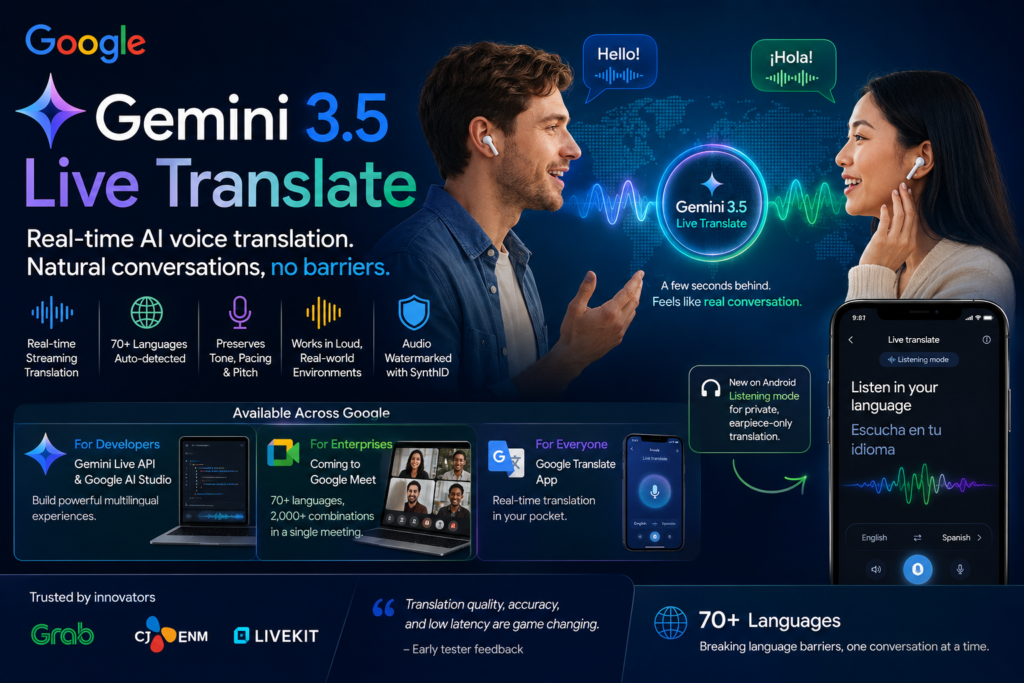
Gemini 3.5 Live Translate is Google’s new audio AI model that turns spoken language into natural-sounding speech in another language within seconds. It automatically detects more than 70 languages, preserves the speaker’s tone and pacing, and is already rolling out across Google AI Studio, Google Meet, and the Google Translate app. If you’ve ever wondered how close AI has gotten to a true “universal translator,” this model is the closest public answer yet.
What Is Gemini 3.5 Live Translate?
Definition: Gemini 3.5 Live Translate is a speech-to-speech translation model built by Google that listens to a live audio stream and generates translated speech continuously, rather than waiting for a speaker to finish a sentence before responding.
Expansion: Unlike earlier AI translation tools that transcribe speech to text, translate that text, and then convert it back to audio in discrete “turns,” Gemini 3.5 Live Translate processes audio as it arrives. It balances two competing needs — accuracy (waiting for enough context) and immediacy (staying in sync with the speaker) — to stay only a few seconds behind the original speech. The result is a translation experience that feels closer to a live interpreter than a chatbot exchange.
How Gemini 3.5 Live Translate Differs From Turn-By-Turn Translation
Older voice translation systems, including many built into video call software, operate in a stop-start pattern: the speaker talks, pauses, and then hears (or the listener hears) a translated response. Gemini 3.5 Live Translate removes that dead air. Because the model generates speech continuously, conversations flow more like a real dialogue between two people who happen to speak different languages, with far fewer of the awkward silences that make cross-language calls feel stilted.
How Does Gemini 3.5 Live Translate Work?
Question: What makes Gemini 3.5 Live Translate technically different from previous models?
Direct answer: It combines automatic language detection, continuous streaming generation, and prosody preservation — meaning it doesn’t just translate words, it recreates how those words are spoken.
Streaming Speech Processing
Gemini 3.5 Live Translate ingests audio in a continuous stream instead of waiting for complete utterances. This streaming architecture is what allows the model to begin producing translated speech almost immediately, rather than processing a full sentence, then a full paragraph, before responding.
Preserving Tone, Pacing, and Pitch
A defining feature of Gemini 3.5 Live Translate is that it carries over the speaker’s intonation, rhythm, and pitch into the translated output. Instead of a flat, robotic voice reading translated text, the output mirrors how the original speaker actually sounds — a detail that matters enormously for anything emotionally nuanced, like a business negotiation, a classroom lesson, or a personal conversation.
Noise Robustness
Real conversations don’t happen in sound booths. Gemini 3.5 Live Translate is built to remain accurate in loud, unpredictable environments, which is part of why Google is testing it for use cases like driver-passenger pickups, where background traffic and street noise are unavoidable.
Where Can You Use Gemini 3.5 Live Translate?
Google is rolling out Gemini 3.5 Live Translate across three distinct surfaces simultaneously, targeting developers, enterprises, and everyday consumers.
For Developers: Gemini Live API and Google AI Studio
Developers can access Gemini 3.5 Live Translate in public preview through the Gemini Live API and directly inside Google AI Studio. This means teams can build custom applications — multilingual call centers, live-streamed events, classroom tools — on top of the same model powering Google’s own products. Platforms including Agora, Fishjam, LiveKit, Pipecat, and Vision Agents already offer integrations that handle the real-time media streaming infrastructure, so developers can focus on building the user experience rather than the plumbing underneath it.
For Enterprises: Google Meet
Speech translation inside Google Meet will soon run on Gemini 3.5 Live Translate. The upgrade is significant: Meet’s translation previously supported only five languages and translated exclusively to and from English. With Gemini 3.5 Live Translate, Meet will support 70+ languages and more than 2,000 language combinations within a single meeting. This is launching in private preview for select business Google Workspace customers, with a broader rollout planned later in the year.
For Everyday Users: The Google Translate App
Gemini 3.5 Live Translate is also rolling out globally in the Google Translate app on Android and iOS. Users simply connect a pair of headphones to get translated speech that mirrors the original speaker’s tone. Android users are also getting a new “listening mode” that streams translated audio directly through the phone’s earpiece — useful for situations like a guided tour, where you want to hear a translation privately and don’t have headphones on hand.
Gemini 3.5 Live Translate vs. Traditional Turn-By-Turn Translation
| Feature | Gemini 3.5 Live Translate | Traditional Turn-By-Turn Translation |
|---|---|---|
| Translation delivery | Continuous, streaming speech | Waits for speaker to finish, then responds |
| Latency feel | A few seconds behind the speaker | Noticeable pauses between turns |
| Voice output | Preserves speaker’s tone, pacing, pitch | Often flat, robotic-sounding output |
| Language coverage | 70+ languages, auto-detected | Frequently limited to a fixed language pair |
| Meeting support (Google Meet) | 2,000+ language combinations | Previously limited to 5 languages, English-only pairing |
| Noise handling | Built for loud, real-world environments | Often degrades in noisy settings |
| Access points | API, Google AI Studio, Meet, Translate app | Typically siloed to a single product |
Key Features of Gemini 3.5 Live Translate at a Glance
- Automatically detects 70+ spoken languages without manual configuration
- Generates translated speech continuously, with only a few seconds of lag
- Preserves the original speaker’s intonation, pacing, and pitch
- Performs reliably in noisy, real-world audio environments
- Available via the Gemini Live API and Google AI Studio for developers
- Rolling out in Google Meet for over 2,000 language combinations
- Available in the Google Translate app on Android and iOS
- Includes a new Android “listening mode” for private, earpiece-only translation
- All generated audio is watermarked with SynthID
Who Is Already Using Gemini 3.5 Live Translate?
Several organizations have started testing Gemini 3.5 Live Translate ahead of its broader rollout. Ride-hailing platform Grab is piloting the model to enable multilingual, near real-time communication between drivers and travelers during pickups — a use case involving over 10 million voice calls per month, where accurate, low-latency translation matters in short, high-pressure interactions. Media company CJ ENM and real-time infrastructure provider LiveKit have also shared feedback, pointing to the model’s translation quality, accuracy, and low latency as standout strengths.
Is Gemini 3.5 Live Translate’s Audio Output Watermarked?
Question: Can you tell if audio was generated by Gemini 3.5 Live Translate?
Direct answer: Yes. Every audio output from Gemini 3.5 Live Translate is watermarked using SynthID, an imperceptible watermark embedded directly into the audio. This doesn’t change how the audio sounds to a listener, but it allows the content to be identified as AI-generated later, which is part of Google’s broader approach to keeping synthetic media detectable and limiting its misuse for misinformation.
How to Get Started With Gemini 3.5 Live Translate
For Developers
Start by exploring the Gemini Live API documentation and testing the model directly inside Google AI Studio, where a live preview environment is already available. Example integrations for real-time dubbing and simultaneous multi-language translation are published in the Gemini Cookbook on GitHub, alongside demos built on infrastructure providers like LiveKit.
For Businesses
If your organization uses Google Workspace, watch for the private preview of Gemini 3.5 Live Translate inside Google Meet. Early access is being extended to select business customers first, with wider availability expected later this year.
For Everyday Users
Update the Google Translate app on Android or iOS, plug in a pair of headphones, and select the Live translate feature to try Gemini 3.5 Live Translate directly. Android users can also test the new listening mode by holding the phone to their ear like a regular call.
Frequently Asked Questions About Gemini 3.5 Live Translate
What languages does Gemini 3.5 Live Translate support? It automatically detects and translates speech across more than 70 languages without requiring manual language selection.
Is Gemini 3.5 Live Translate available to the public right now? Parts of it are. Developers can access it in public preview through the Gemini Live API and Google AI Studio, and consumers can use it today in the Google Translate app. The Google Meet integration is currently in private preview for select business customers.
Does Gemini 3.5 Live Translate work in noisy environments? Yes. The model is designed with noise robustness in mind, which is one reason it’s being tested for use cases like driver pickups where background noise is constant.
How is Gemini 3.5 Live Translate different from Google Translate’s older voice features? Older voice translation tools in Google Translate and similar apps typically wait for a full utterance before translating and often produce flatter, more robotic speech. Gemini 3.5 Live Translate streams translation continuously and preserves the speaker’s natural tone and pacing.
Can I tell if audio was created by Gemini 3.5 Live Translate? Yes — all generated audio carries an inaudible SynthID watermark that identifies it as AI-generated.
Conclusion
Gemini 3.5 Live Translate represents a meaningful shift in how AI handles spoken language: away from stilted, turn-based exchanges and toward continuous, natural-sounding conversation across languages. Whether you’re a developer building on the Gemini Live API, a business piloting multilingual meetings, or simply someone traveling abroad with the Google Translate app, Gemini 3.5 Live Translate is designed to make cross-language conversation feel less like using a tool and more like talking to another person.