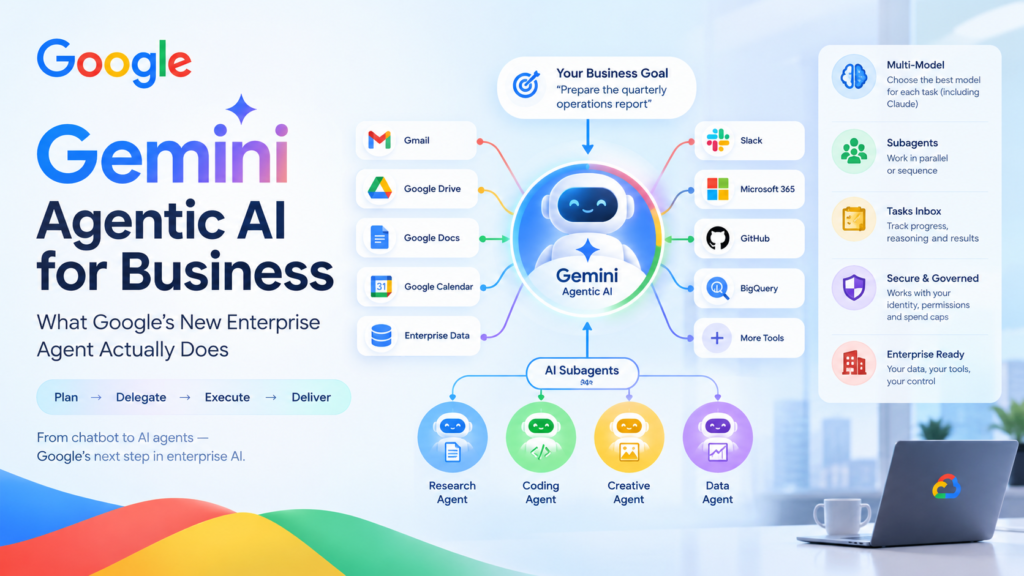
Gemini agentic AI is Google’s move from a chatbot that answers questions to an agent that plans, executes and finishes work across a company’s own systems. Announced on October 8, 2026 at Google Cloud’s Gemini at Work event, it launches for businesses first, with consumers to follow later, according to TechCrunch.
If you have been wondering whether this is a rebrand or a real shift, the short answer is that it is a real shift in how work gets delegated. Instead of typing a prompt and copying the result into another tool, you hand the agent a goal, and it returns finished work inside the documents, inboxes and developer tools you already use. This guide explains what was announced, how it works, where it connects, what it costs to govern, and what it means for teams and learners in India.
Quick facts at a glance
- What it is: A single “Gemini agent” that answers questions, handles knowledge work, creates media and writes and runs code.
- Who gets it first: Businesses, via Gemini Enterprise. Consumers come later.
- Headline features: Subagents, a model picker (including Anthropic’s Claude), a tasks inbox, its own workplace identity and email address, and real-time spend caps.
- Sources: TechCrunch (Sarah Perez, Oct 8, 2026) and Google Cloud’s announcement by Thomas Kurian (Oct 8, 2026).
What Is Gemini Agentic AI?
Gemini agentic AI is a unified AI agent from Google that takes a business objective, plans the steps, uses tools and company data to carry them out, and reports back with completed work. Unlike a standard chatbot, it does not wait for you to supply every instruction. It decides how to break a goal into tasks, which skills to load and which model should handle each step.
In plain terms, the Gemini agent combines three things that used to be separate products: a conversational assistant, an autonomous task runner and a coding agent. Google describes it as one agent behind a single prompt box and a single API. You can chat with it, assign it longer jobs, schedule recurring work or let it respond to events.
How is this different from the Gemini chatbot people already use?
The difference is ownership of the outcome. A chatbot produces text and stops. An agent owns a task: it can send an email, update a document, query a database, schedule a meeting and keep working for hours or days after you close your laptop. Google’s announcement says the agent runs in the cloud, so its memory and context stay consistent no matter which device or channel you use to reach it.
Objectives, not instructions
Google Cloud CEO Thomas Kurian framed the shift as giving the agent objectives rather than step-by-step instructions, per TechCrunch. That means you delegate an outcome (“prepare the quarterly operations report”) and come back to a finished deliverable. To make that possible, the agent needs three supporting layers, which Google calls tools, skills and context:
- Tools connect it to your software and data.
- Skills are reusable instructions that teach it how your team does multi-step work.
- Context is the memory of your people, projects and past work.
A coworker with its own identity
The most distinctive idea is that the agent gets its own Workspace account, as if it were another colleague. According to TechCrunch, that includes its own email address and its own context, and it knows who is on which team, which time zones people work in, who approves what and what sits on calendars. You can call it by tagging it, emailing it, sharing a file with it or adding it to a group chat. Google’s announcement adds that coworker agents receive addresses in the form of an agents.company.com email and persistent storage of their own, and they see only what you or your team share with them.
How the Gemini Agent Plans, Delegates and Remembers
The Gemini agent works by planning a task, spinning up temporary subagents for parallel or sequential steps, loading the right skills and writing progress to a tasks inbox you can watch. Understanding this loop helps you decide which work to hand over first.
What happens after you assign a goal?
The agent plans, delegates, executes and reports. Per the announcement, it can dynamically create a roster of subagents, which are temporary, job-specific agents that each carry their own identity. The lead agent coordinates them, including workflows that mix parallel and sequential steps and that can run for hours or days.
TechCrunch reports that you can follow along from a “tasks inbox,” where you see the agent’s reasoning, how it delegated work to subagents, which special skills it loaded, the code it ran and its progress. For busy managers, that visibility is the difference between trusting an agent and merely hoping it worked.
How does the agent choose a model?
By default, it picks the best model for each task, and you can override that choice. TechCrunch reports that users can select a model themselves, including third-party models, starting with Anthropic’s Claude models. Google says it plans to extend the model picker to open-source and other private models.
The logic is economic as well as technical. Google argues that the best model for a job is not always the largest one: matching the model to the work improves accuracy on hard tasks and lowers cost on simple ones. It also argues that keeping model choice open means your context, skills and data stay put when the leading model changes, which Google notes happens every few months.
What does the agent remember?
It keeps four kinds of memory. The announcement describes them as:
- Session memory for the task in front of it, even when a job runs for days.
- Semantic memory, a structured knowledge base built as it reads documents and works with people and other agents.
- Procedural memory for how a job gets done, including skills the agent writes for itself.
- Episodic memory of what it has done before.
Google says the agent “onboards” itself like a new hire, learning you, your tools and your team before it starts.
Skills and registries
Skills are reusable, modular sets of instructions and workflows. Gemini ships with a global library, and teams or departments can publish custom skills to a shared company registry. Individuals can build personal skills too. There is also an enterprise tools registry, so one team can build a tool and publish it for the rest of the company. For organizations, this is where institutional knowledge, such as pricing rules, departmental norms and approval chains, gets encoded once and reused.
Where the Gemini Agent Connects: Systems, MCP and Surfaces
The Gemini agent connects to the business software and data you already run, and it can reach any Model Context Protocol (MCP) server inside or outside your network. That breadth is what turns an assistant into something that can actually finish work.
Which systems can the agent reach?
TechCrunch lists Google Workspace, Microsoft 365, Slack, Jira, Confluence, Git, BigQuery, Databricks, Postgres and Snowflake, among others. Google’s announcement also names Salesforce, ServiceNow and Teams, plus files on your own desktop. Requests can include attachments such as files and folders, or projects built for a specific workstream that bundle files and skills together.
What is an MCP server, and why does it matter here?
The Model Context Protocol is an open standard that lets AI agents connect to external tools and data sources through a common interface. Support for MCP servers means the agent is not limited to a fixed list of integrations. If your company or a vendor exposes a tool through MCP, the agent can use it securely. This is the same standard that many other AI platforms use, which makes the Gemini agent easier to fit into mixed environments.
Where can people reach the agent?
According to TechCrunch, the agent is accessible from:
- iOS and Android mobile devices
- Windows and Mac desktops
- The command line interface
- Google Workspace
- Microsoft 365
- ServiceNow
- Slack
Google adds that it can run as a headless agent, meaning it needs no dedicated interface and can be built into third-party applications. Inside Workspace, it works directly in Gmail, Drive, Docs, Slides, Sheets, Chat and Calendar, carrying the same memory, skills and controls everywhere.
What does a real workflow look like?
Google gives a few examples. Ask it to set up a meeting with the “usual team of regional event leads,” and it works out who they are from your chat space and previous threads, checks calendars and starts an email thread to find a time. Or have it research market trends, build a financial model in Sheets and create a deck that presents both, without re-explaining the project at each step. It can even proactively suggest tasks to delegate, such as turning a manager’s request for a project update into a slide deck with one click.
Security, Governance and Cost Controls
Two factors decide whether an enterprise agent program succeeds or stalls: whether you can govern it and whether you can afford it. Google’s own announcement makes this point, and it is the part of the launch most worth reading closely.
How does Google secure autonomous agents?
Sundar Pichai said at the event that starting with businesses lets Google tackle the “harder problems around security, scale, and performance,” per TechCrunch. The announcement outlines a layered approach:
- Identity: Every agent gets its own cryptographically attested identity, governed like an employee with least-privilege permissions. That identity is stamped into its logs and into any virtual machine spun up to run code on its behalf.
- Authorization: Administrators approve fine-grained, role-based permissions. When the agent connects to an external system, its identity is mapped and propagated through standards such as OAuth.
- Auditing: Every action is written to an audit trail and attributed to the agent rather than a person, which TechCrunch also highlights.
- Sandboxing and gateway: Agents execute tasks inside an Agent Sandbox with its own network boundary, and all traffic passes through Agent Gateway, which Google describes as an AI network firewall enforcing policy in real time. You write a rule once, such as barring agents from documents classified as need-to-know, and it applies to every agent.
Google frames governance around four questions: who is the agent, what is it allowed to do, what did it do and what should it never touch.
How do cost controls work?
Google offers multi-model orchestration, smart routing and real-time spend caps. Smart routing triages each workload to the model that delivers the needed performance at the lowest cost. Spend caps let administrators set a hard limit on a project’s AI spend in the Cloud Billing Console. If a cap triggers, that project’s agent pauses, and someone can resume it with one click. Because tracking is per project, companies can charge AI costs back to specific departments.
What about pricing and availability?
Neither TechCrunch nor Google’s announcement, in the material reviewed for this article, gives a price list or a general availability date for the new agent. Google does say industry-specific versions are in preview for Financial Services and Legal, with Government, Healthcare and Retail coming soon. Check Google Cloud directly for current availability before planning a rollout.
Who Is Using It, and Why Businesses Come First
Google is leading with enterprises because Gemini already has the distribution to make agents work at scale. Pichai noted that Gemini has more than 1 billion monthly active users and that nearly 90% of Fortune 100 companies use Gemini Enterprise, as TechCrunch reports.
Early testers
TechCrunch says early testers of the agent included sportswear brand On, Shopify and PayPal. Google’s announcement says On tested dynamic model selection to speed up time to market, Shopify blends frontier models for millions of merchants and PayPal routes 10 million multi-model requests every week.
Customer results reported by Google
The following figures are Google’s own reporting on Gemini Enterprise customers, not independent measurements:
- Bradesco cut document review time from one hour to five minutes in finance workflows.
- Orange Spain is deploying more than 1,000 custom agents built by employees across HR, IT, sales and customer service.
- SOMPO built over 10,000 custom agents across 34,000 employees.
- Tata Steel deployed more than 300 specialized agents in nine months, and Google says customer complaint turnaround fell by 50%.
- Wesfarmers says an internal agent at Bunnings saved staff half a million hours of administrative work.
Treat these as directional. They show the pattern, which is many small, role-specific agents built by non-engineers, rather than one monolithic system.
The Gemini Agent vs. a Traditional AI Chatbot
The clearest way to see the change is to compare what each approach does with the same request. The table below sets a typical chatbot beside Gemini agentic AI, using details from Google’s announcement and TechCrunch’s report.
| Dimension | Traditional AI chatbot | Gemini agent |
|---|---|---|
| Input | A prompt or question | An objective with attachments, files or a project |
| Output | Text, code or an image to copy elsewhere | Finished work delivered in your documents, inbox or tools |
| Planning | You supply the steps | The agent plans, delegates to subagents and loads skills |
| Duration | One conversation turn | Hours or days of cloud-based execution |
| Systems access | Usually none, or limited plug-ins | Workspace, Microsoft 365, Slack, Jira, databases and any MCP server |
| Model choice | One model | Automatic selection, with manual override including Claude |
| Identity | Acts as a tool under your account | Has its own account, email address and audit trail |
| Oversight | Read the chat history | Tasks inbox showing reasoning, delegation, code and progress |
| Cost control | Per-seat or per-token billing | Smart routing and real-time project spend caps |
The practical takeaway is that the unit of work changes from “a response” to “an assigned task with an owner.” That is why governance features such as identity, audit trails and spend caps sit at the center of the launch rather than at the edges.
What Gemini Agentic AI Means for India
For Indian companies, startups and learners, Gemini agentic AI signals that agent skills are becoming a core workplace competency, not a niche specialty. This section is analysis rather than reporting, drawing on the facts above.
Is this relevant outside the West?
Yes. Google’s own list of Asia-Pacific customers includes Tata Steel and names TCS among other APAC leaders, which shows large Indian enterprises are already in the Gemini Enterprise customer base. The Tata Steel result Google cites, hundreds of specialized agents deployed in nine months, suggests Indian industrial and services firms are moving beyond pilots.
What changes for freshers and young professionals?
Three shifts stand out for early-career professionals in Odisha and across India:
- Delegation becomes a skill. Writing a clear objective, defining success criteria and reviewing an agent’s output matters as much as doing the task by hand.
- Domain knowledge gets encoded as skills. People who understand a function well, such as finance operations or customer support, can turn that knowledge into reusable skills for the whole team.
- Governance literacy becomes valuable. Understanding permissions, audit trails and spend limits is a differentiator, especially at service companies deploying agents for global clients.
What should Indian businesses watch?
Data location, access permissions and compliance obligations deserve a review before any rollout, because agents act across systems and hold persistent memory. Smaller firms should note that the cost-control features, including per-project caps, address a worry that often blocks adoption: unpredictable AI bills.
How to Prepare Your Team for the Gemini Agent
The best preparation is to pick a narrow, repeatable workflow, define what “done” looks like and set permissions and limits before you scale. Before adopting Gemini agentic AI, work through these steps.
- Choose one workflow. Pick something repetitive with a clear output, such as weekly reporting, document review or ticket triage.
- Write the objective. State the goal, the inputs, the acceptable sources and the format of the final deliverable.
- Map the systems. List which tools and data the agent needs, and grant only that access.
- Capture the know-how. Document how your best people do the task so it can become a reusable skill.
- Set guardrails. Decide what the agent must never touch, who approves its actions and what its spend cap should be.
- Review the audit trail. Check what the agent did, where it was wrong and which steps still need a human.
- Expand gradually. Add workflows once the first one is reliable.
What should you avoid?
Avoid giving the agent broad access on day one, skipping human review for high-stakes outputs and treating vendor-reported savings as guarantees. Pilot, measure, then scale.
Frequently Asked Questions
What is the Gemini agent in one sentence?
The Gemini agent is Google’s unified agent that takes a business goal, plans the work, uses tools and company data, and returns finished results rather than just answers.
When was it announced?
Google announced it on Thursday, October 8, 2026, at its Gemini at Work event, as reported by TechCrunch.
Is Gemini agentic AI available to consumers?
Not at launch. TechCrunch reports that Google will initially bring the agent to businesses and roll it out to consumers later.
Can it use models other than Google’s?
Yes. Users can choose the model, including third-party options, starting with Anthropic’s Claude models. Google says open-source and other private models are planned for the picker.
Does the agent have its own email address?
Yes. Per TechCrunch, it gets its own Workspace account, including an email address, and its actions are logged to an audit trail attributed to the agent.
Which tools can it connect to?
It connects to Google Workspace, Microsoft 365, Slack, Jira, Confluence, Git, BigQuery, Databricks, Postgres, Snowflake and more, plus any MCP server inside or outside a company network.
How are costs controlled?
Through multi-model orchestration, smart routing and real-time spend caps. When a project hits its cap, its agent pauses until someone resumes it.
How much does it cost?
The material reviewed does not state pricing. Contact Google Cloud for current details.
Final Thoughts
Gemini agentic AI is less about a smarter chatbot and more about a new way to assign and supervise work. Its most important ideas are not the flashy ones. Giving the agent its own identity, an audit trail, a sandbox and spend caps is what makes it possible to trust it with real tasks. Whether you run a company, lead a team or are just starting your career, now is the time to learn how to write good objectives, encode your expertise as skills and keep humans in the loop.
Want to build these skills? Explore Kalinga.ai’s guides, workshops and AI training programs to learn how to work with AI agents, from prompting and workflows to governance and real-world deployment.